Dockman

Dockman est un gestionnaire Docker Compose qui garde vos fichiers là où vous les avez créés et vous laisse tout contrôler depuis une interface web épurée. Mon installation tourne entièrement autour de Docker Compose, chaque conteneur que j’exécute fait partie d’une stack. J’avais besoin d’un éditeur simple pour écrire mes configurations et les déployer en un clic. Écrire des fichiers compose ne me dérange pas, mais taper cd dossier && docker compose -f fichier.yml up -d encore et encore, ou jongler entre différents outils pour gérer les conteneurs, devient fastidieux avec le temps.
Les points forts
- Accès direct aux fichiers : vos fichiers compose restent là où vous les avez créés, Dockman ne les embarque pas dans une base de données ou un dossier caché. Vous continuez à les modifier avec vos outils habituels.
- Interface épurée : pas de menus profondément imbriqués, pas de fonctionnalités “Enterprise™” inutiles pour un homelab. Tout est accessible via une interface web claire, pensée pour aller vite.
- Légèreté : Dockman consomme vraiment peu de ressources (même si Portainer reste raisonnable), ça se sent au démarrage.
- Gestion de l’environnement Docker : images, volumes, réseaux, tout ce qu’il faut pour nettoyer proprement après une installation ou une série de tests.
Les limitations à connaître
- Sécurité basique : l’authentification par nom d’utilisateur/mot de passe est disponible, mais il n’y a pas de multifacteur natif. Une couche externe type Authelia ou Authentik reste recommandée si vous exposez l’interface sur Internet.
- Multi-hôtes en bêta : la gestion de plusieurs hôtes Docker est encore en développement, donc à ne pas considérer comme stable pour l’instant.
Installation basique
Utilisez l’image officielle publiée par l’auteur : ghcr.io/ra341/dockman:latest
Créer les dossiers
1
mkdir -p /sharenfs/docker-app/dockman/stacks /sharenfs/docker-app/dockman/config
Dockman démarre sans authentification activée, vous devez l’activer explicitement via les variables d’environnement. Pour sécuriser l’accès, ajoutez les variables suivantes à votre fichier compose :
1
2
3
      - DOCKMAN_AUTH_ENABLE=true
      - DOCKMAN_AUTH_USERNAME=votre_username
      - DOCKMAN_AUTH_PASSWORD=votre_mot_de_passe_securise
Créer un fichier docker-compose.yml
1
2
cd /sharenfs/docker-app/dockman/
nano docker-compose.yml
avec le contenu suivant :
1
2
3
4
5
6
7
8
9
10
11
12
13
14
15
16
17
18
services:
  dockman:
    container_name: dockman
    image: ghcr.io/ra341/dockman:latest
    environment:
      # 1️⃣
      - DOCKMAN_COMPOSE_ROOT=/sharenfs/docker-app/dockman/stacks
      - DOCKMAN_AUTH_ENABLE=true
      - DOCKMAN_AUTH_USERNAME=votre_username
      - DOCKMAN_AUTH_PASSWORD=votre_mot_de_passe_securise
    volumes:
      #  2️⃣                                  3️⃣
      - /sharenfs/docker-app/dockman/stacks:/sharenfs/docker-app/dockman/stacks
      - /sharenfs/docker-app/dockman/config:/config
      - /var/run/docker.sock:/var/run/docker.sock
    ports:
      - "8866:8866"
    restart: always
Le chemin de répertoire des piles doit être absolu et identique dans les trois emplacements:
- 1️⃣ Variable d’environnement: `DOCKMAN_COMPOSE_ROOT=/sharenfs/docker-app/dockman/stacks
- 2️⃣ Le côté hôte du volume /sharenfs/docker-app/dockman/stacks
- 3️⃣ Le côté conteneur du volume
/sharenfs/docker-app/dockman/stacksCette cohérence de chemin est essentielle pour que Dockman localise et gère correctement vos fichiers de composition.
Lancez votre stack avec la commande :
1
docker compose up -d
Ouvrez maintenant votre navigateur et accédez à Dockman sur http://votre-ip:8866
Dockman sécurisé
Gardez le dockman local seulement. Il est conçu pour votre réseau privé, pas pour Internet. Quand vous avez besoin de distance accéder, utiliser un VPN comme Netbird ou Tailscale pour effectuer un tunnel en toute sécurité votre réseau.
- Utilisation domaine local
home.arpa, voir Domaine home.arpa + Autorité de certification (AC) - Générer les certificats pour le domaine local
dockman.home.arpa
Dockman proxy nginx
Passage en https + proxy + certificats SSL
La configuration nginx: /etc/nginx/conf.d/dockman.home.arpa.conf
1
2
3
4
5
6
7
8
9
10
11
12
13
14
15
16
17
18
19
20
21
22
23
24
25
26
27
28
29
30
31
32
33
34
35
36
37
38
39
40
41
42
server {
 listen 80;
 listen [::]:80;
 server_name dockman.home.arpa;
 return 301 https://$host$request_uri;
}

server {
 listen 443 ssl;
 listen [::]:443 ssl;
 http2 on;
 server_name dockman.home.arpa;

    ssl_certificate      /etc/ssl/private/dockman.home.arpa.crt;
    ssl_certificate_key  /etc/ssl/private/dockman.home.arpa.key;

# --- Bypass agent API and proxy to backend (same backend used for UI) ---
location ~ ^/(agent/.*|api/agents.*|api/endpoints.*) {
    proxy_pass http://127.0.0.1:8866;
    proxy_set_header Host $host;
    proxy_set_header X-Real-IP $remote_addr;
    proxy_set_header X-Forwarded-For $proxy_add_x_forwarded_for;
    proxy_set_header X-Forwarded-Proto $scheme;
    proxy_http_version 1.1;
    proxy_set_header Upgrade $http_upgrade;
    proxy_set_header Connection "upgrade";
}

# --- UI / tout le reste ---
location / {
    proxy_set_header Host $host;
    proxy_set_header X-Real-IP $remote_addr;
    proxy_set_header X-Forwarded-For $proxy_add_x_forwarded_for;
    proxy_set_header X-Forwarded-Proto $scheme;
    proxy_http_version 1.1;
    proxy_set_header Upgrade $http_upgrade;
    proxy_set_header Connection "upgrade";

    proxy_pass http://127.0.0.1:8866;
}

}
Recharger nginx
1
sudo systemctl reload nginx
Gestion des distants
Ouvrir le lien https://dockman.home.arpa
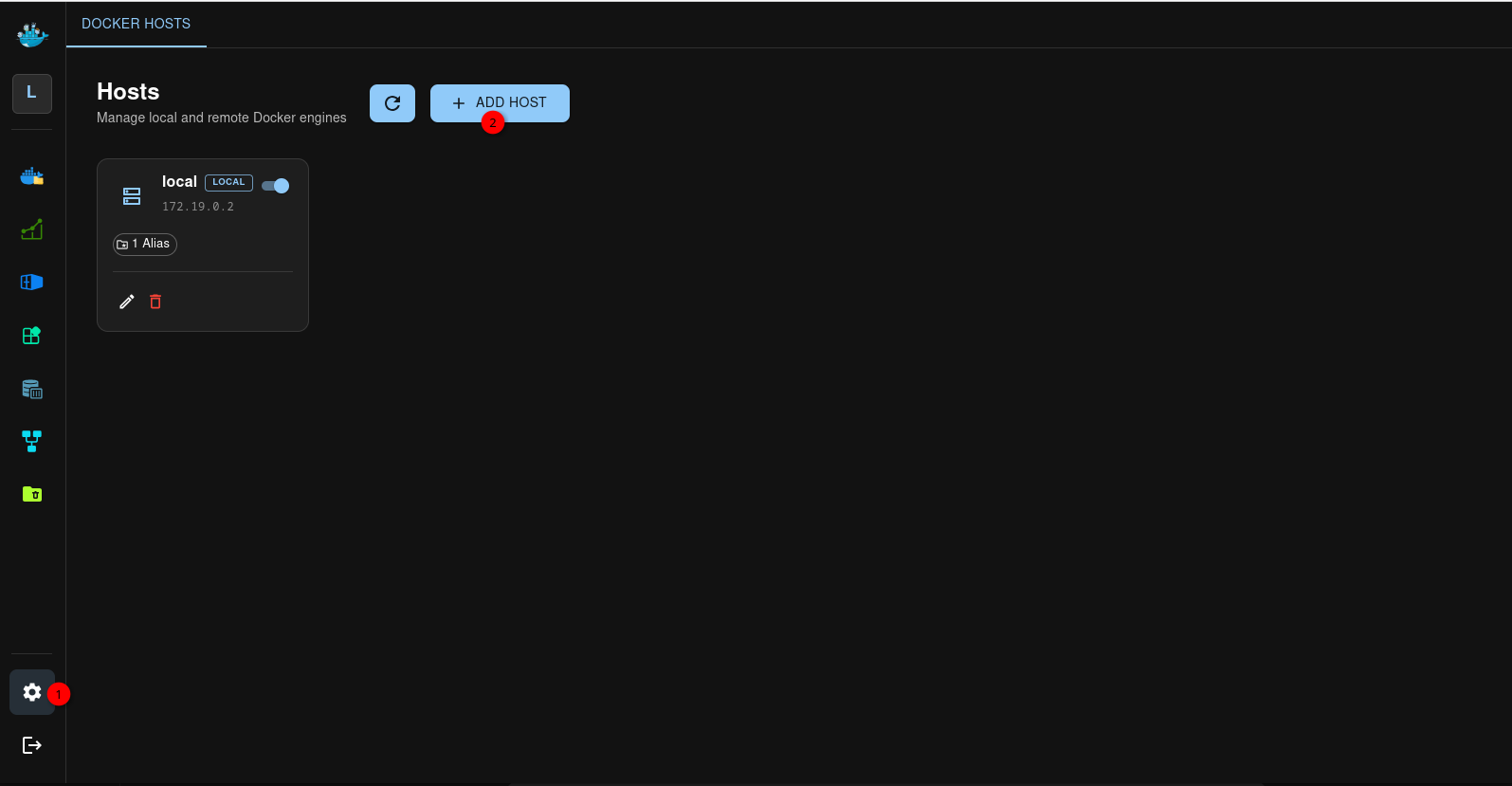
Tentative installation
structure docker compose sur les machines, docker s’exécute en mode utilisateur (pas de sudo)
Les stacks
1
2
3
4
5
6
7
8
9
10
11
12
13
14
15
16
17
18
19
20
21
22
23
24
25
26
27
machine cwwk
ssh yick@192.168.0.205 -p 55205 -i /home/yann/.ssh/yick-ed25519
/sharenfs/docker-app/
├── graphhopper
├── immich-app
├── portainer
└── watchtower

machine alpine02
ssh rad@192.168.0.222 -p 55222 -i /home/yann/.ssh/pvm-alpine02
$HOME/
├── apprise-api
├── bezel
├── linkwarden
├── searxng
├── speedtest
├── ttrss
└── watchtower

machine alpine03
ssh alpi@192.168.0.223 -p 55223 -i /home/yann/.ssh/pvm-alpine03
$HOME/
├── bezel
├── omni-tools
├── paperless
├── stirling
└── watchtower
Schéma base sqlite dockman
1
sqlite3 /sharenfs/docker-app/dockman/config/dockman.db ".schema"
1
2
3
4
5
6
7
8
9
10
11
12
13
14
15
16
17
18
19
20
21
22
23
24
25
26
27
28
29
30
31
32
33
34
35
36
37
38
39
40
41
42
43
44
45
46
47
48
49
50
51
52
53
54
55
56
57
58
59
60
61
62
63
64
65
66
67
68
69
70
71
72
73
74
75
76
77
78
79
80
81
82
83
84
85
86
87
88
89
90
91
92
93
94
95
96
97
98
99
100
101
102
103
104
105
106
107
108
109
110
111
112
113
114
115
116
117
118
119
120
121
122
123
124
125
126
127
128
129
130
131
132
133
134
135
136
137
138
139
140
141
142
143
144
145
CREATE TABLE goose_db_version (
		id INTEGER PRIMARY KEY AUTOINCREMENT,
		version_id INTEGER NOT NULL,
		is_applied INTEGER NOT NULL,
		tstamp TIMESTAMP DEFAULT (datetime('now'))
	);
CREATE TABLE sqlite_sequence(name,seq);
CREATE TABLE `users`
(
    `id`                 integer  NULL PRIMARY KEY AUTOINCREMENT,
    `created_at`         datetime NULL,
    `updated_at`         datetime NULL,
    `deleted_at`         datetime NULL,
    `username`           text     NOT NULL,
    `encrypted_password` text     NOT NULL
);
CREATE UNIQUE INDEX `idx_users_username` ON `users` (`username`);
CREATE INDEX `idx_users_deleted_at` ON `users` (`deleted_at`);
CREATE TABLE `sessions`
(
    `id`           integer  NULL PRIMARY KEY AUTOINCREMENT,
    `created_at`   datetime NULL,
    `updated_at`   datetime NULL,
    `deleted_at`   datetime NULL,
    `user_id`      integer  NULL,
    `hashed_token` text     NULL,
    `expires`      datetime NULL,
    CONSTRAINT `fk_sessions_user` FOREIGN KEY (`user_id`) REFERENCES `users` (`id`) ON UPDATE NO ACTION ON DELETE NO ACTION
);
CREATE INDEX `idx_sessions_hashed_token` ON `sessions` (`hashed_token`);
CREATE INDEX `idx_sessions_deleted_at` ON `sessions` (`deleted_at`);
CREATE TABLE `folder_aliases_2`
(
    `id`         integer  NULL PRIMARY KEY AUTOINCREMENT,
    `created_at` datetime NULL,
    `updated_at` datetime NULL,
    `deleted_at` datetime NULL,
    `config_id`  integer  NULL,
    `alias`      text     NULL,
    `fullpath`   text     NULL,
    CONSTRAINT `fk_host_config_folder_aliases` FOREIGN KEY (`config_id`) REFERENCES `host_config` (`id`) ON UPDATE NO ACTION ON DELETE NO ACTION
);
CREATE UNIQUE INDEX `idx_config_path` ON `folder_aliases_2` (`config_id`, `fullpath`);
CREATE UNIQUE INDEX `idx_config_alias` ON `folder_aliases_2` (`config_id`, `alias`);
CREATE INDEX `idx_folder_aliases_2_deleted_at` ON `folder_aliases_2` (`deleted_at`);
CREATE TABLE `version_history`
(
    `id`         integer  NULL PRIMARY KEY AUTOINCREMENT,
    `created_at` datetime NULL,
    `updated_at` datetime NULL,
    `deleted_at` datetime NULL,
    `version`    text     NOT NULL,
    `read`       numeric  NOT NULL DEFAULT false
);
CREATE UNIQUE INDEX `version_history_version` ON `version_history` (`version`);
CREATE INDEX `idx_version_history_deleted_at` ON `version_history` (`deleted_at`);
CREATE TABLE `user_configs`
(
    `id`          integer  NULL PRIMARY KEY AUTOINCREMENT,
    `created_at`  datetime NULL,
    `updated_at`  datetime NULL,
    `deleted_at`  datetime NULL,
    `enable`      numeric  NOT NULL DEFAULT false,
    `notify_only` numeric  NOT NULL DEFAULT false,
    `interval`    integer  NOT NULL DEFAULT 43200000000000
);
CREATE INDEX `idx_user_configs_deleted_at` ON `user_configs` (`deleted_at`);
CREATE TABLE `prune_configs`
(
    `id`          integer  NULL PRIMARY KEY AUTOINCREMENT,
    `created_at`  datetime NULL,
    `updated_at`  datetime NULL,
    `deleted_at`  datetime NULL,
    `enabled`     numeric  NULL,
    `interval`    integer  NULL,
    `volumes`     numeric  NULL,
    `networks`    numeric  NULL,
    `images`      numeric  NULL,
    `containers`  numeric  NULL,
    `build_cache` numeric  NULL
, `host` text NULL);
CREATE INDEX `idx_prune_configs_deleted_at` ON `prune_configs` (`deleted_at`);
CREATE TABLE `prune_results`
(
    `id`                  integer  NULL PRIMARY KEY AUTOINCREMENT,
    `created_at`          datetime NULL,
    `updated_at`          datetime NULL,
    `deleted_at`          datetime NULL,
    `host`                text     NULL,
    `err`                 text     NULL,
    `volumes_success`     text     NULL,
    `volumes_err`         text     NULL,
    `networks_success`    text     NULL,
    `networks_err`        text     NULL,
    `images_success`      text     NULL,
    `images_err`          text     NULL,
    `containers_success`  text     NULL,
    `containers_err`      text     NULL,
    `build_cache_success` text     NULL,
    `build_cache_err`     text     NULL
);
CREATE INDEX `idx_prune_results_deleted_at` ON `prune_results` (`deleted_at`);
CREATE TABLE `ssh_configs`
(
    `id`          integer  NULL PRIMARY KEY AUTOINCREMENT,
    `created_at`  datetime NULL,
    `updated_at`  datetime NULL,
    `deleted_at`  datetime NULL,
    `name`        text     NOT NULL,
    `public_key`  blob     NULL,
    `private_key` blob     NULL
);
CREATE UNIQUE INDEX `ssh_configs_name` ON `ssh_configs` (`name`);
CREATE INDEX `idx_ssh_configs_deleted_at` ON `ssh_configs` (`deleted_at`);
CREATE TABLE `ssh_host_info`
(
    `id`                  integer  NULL PRIMARY KEY AUTOINCREMENT,
    `created_at`          datetime NULL,
    `updated_at`          datetime NULL,
    `deleted_at`          datetime NULL,
    `host`                text     NOT NULL,
    `port`                integer  NOT NULL DEFAULT 22,
    `user`                text     NOT NULL,
    `password`            text     NULL,
    `remote_public_key`   text     NULL,
    `use_public_key_auth` numeric  NOT NULL DEFAULT false
);
CREATE INDEX `idx_ssh_host_info_deleted_at` ON `ssh_host_info` (`deleted_at`);
CREATE TABLE `host_config`
(
    `id`            integer  NULL PRIMARY KEY AUTOINCREMENT,
    `created_at`    datetime NULL,
    `updated_at`    datetime NULL,
    `deleted_at`    datetime NULL,
    `name`          text     NULL,
    `type`          text     NULL,
    `enable`        numeric  NOT NULL DEFAULT false,
    `docker_socket` text     NULL,
    `ssh_id`        integer  NULL     DEFAULT (null),
    `machine_addr`  text     NULL,
    CONSTRAINT `fk_host_config_ssh_options` FOREIGN KEY (`ssh_id`) REFERENCES `ssh_host_info` (`id`) ON UPDATE NO ACTION ON DELETE NO ACTION
);
CREATE INDEX `idx_host_config_deleted_at` ON `host_config` (`deleted_at`);
CREATE UNIQUE INDEX `idx_prune_configs_host` ON `prune_configs` (`host`);
Ok — sur ta DB, l’objet “cwwk” est dans host_config, et ses identifiants SSH/clé viennent de ssh_host_info et/ou de ssh_configs.
Fais ces requêtes pour retrouver exactement la clé (private_key/public_key) associée à cwwk :
1) Trouver l’entry host_config pour cwwk
1
sqlite3 /sharenfs/docker-app/dockman/config/dockman.db "SELECT id, name, type, ssh_id, machine_addr FROM host_config;"
1
2
1|local|local||172.22.0.2
2|cwwk|ssh|1|
Super : cwwk est host_config.id=2 et ssh_id=1.
Fais maintenant :
1) Lire les infos SSH (y compris use_public_key_auth et password) :
1
sqlite3 /sharenfs/docker-app/dockman/config/dockman.db "SELECT id, host, port, user, use_public_key_auth, password, remote_public_key FROM ssh_host_info WHERE id=1;"
1
1|192.168.0.205|55205|yick|1||ecdsa-sha2-nistp256 AAAAE2VjZHNhLXNoYTItbmlzdHAyNTYAAAAIbmlzdHAyNTYAAABBBHvgVooS7uHrLmzKfdWGdxMhlvCefY/IyG39jLCYig0NrPgkmA3UrX6ioLQcojE9Tr8eITPTmk+oSANdn3F6kvQ= added by dockman for on 2026-06-24T15:49:56Z
2) Identifier la/les clés stockées dans ssh_configs (toutes) :
1
sqlite3 /sharenfs/docker-app/dockman/config/dockman.db "SELECT id, name FROM ssh_configs;"
1
1|defaultSSHKey
3) Voir si host_config.ssh_id=1 pointe vers un ssh_configs (ou si c’est stocké ailleurs) : trouve les tables qui relient ssh_configs à ssh_host_info/host_config :
1
sqlite3 /sharenfs/docker-app/dockman/config/dockman.db "SELECT sql FROM sqlite_master WHERE type='table' AND sql LIKE '%ssh_configs%';"
1
2
3
4
5
6
7
8
9
10
CREATE TABLE `ssh_configs`
(
    `id`          integer  NULL PRIMARY KEY AUTOINCREMENT,
    `created_at`  datetime NULL,
    `updated_at`  datetime NULL,
    `deleted_at`  datetime NULL,
    `name`        text     NOT NULL,
    `public_key`  blob     NULL,
    `private_key` blob     NULL
)
Copie-colle ici les sorties des commandes (1) et (3). Avec ça je te donne la requête exacte pour extraire private_key/public_key correspondant à cwwk.
Tes données montrent que Dockman a créé pour cwwk (ssh_host_info.id=1) une configuration avec use_public_key_auth=1 et une clé publique “ecdsa-sha2-nistp256 …” (pas ed25519). Ça explique pourquoi il ne “réutilise” pas tes clés ed25519 existantes.
Donc : Dockman utilise sa propre paire clé générée pour l’hôte (stockée dans ssh_configs), et cette paire n’est pas forcément tes clés ~/.ssh/*.
Pour récupérer exactement la clé privée/générée par Dockman, exporte la/les entrées de ssh_configs et cherche laquelle correspond à cette clé publique (la valeur textuelle visible dans remote_public_key).
1) Exporter les ssh_configs avec leurs id/name :
1
sqlite3 /sharenfs/docker-app/dockman/config/dockman.db "SELECT id, name FROM ssh_configs;"
1
1|defaultSSHKey
2) Pour chaque ssh_configs.id, afficher le public_key (blob) en “texte” (souvent base64/openssh lisible) :
1
sqlite3 /sharenfs/docker-app/dockman/config/dockman.db "SELECT id, name, hex(public_key) FROM ssh_configs;"
Puis, le plus simple (et fiable) : export direct du blob en fichier, et vérifier le public key :
3) Pour un ssh_configs donné (ex: SSHCONF_ID=...), écrire les blobs en fichiers et récupérer la publique :
1
2
3
4
SSHCONF_ID=1
mkdir -p /tmp/dockman_sshkeys
sqlite3 /sharenfs/docker-app/dockman/config/dockman.db "SELECT public_key  FROM ssh_configs WHERE id=$SSHCONF_ID;" | xxd -r -p > /tmp/dockman_sshkeys/public.bin
sqlite3 /sharenfs/docker-app/dockman/config/dockman.db "SELECT private_key FROM ssh_configs WHERE id=$SSHCONF_ID;" | xxd -r -p > /tmp/dockman_sshkeys/private.bin
Mais comme on ne sait pas le format exact du blob (brut/der/PEM), la meilleure étape maintenant est que tu me donnes la sortie de la commande (1). Ensuite je te fournis la commande d’export exacte correspondant au bon ssh_configs.id pour obtenir une clé ed25519/ecdsa exploitable (ou au minimum la publique à comparer).
Installe xxd (paquet vim-common / vim-runtime selon ta distro). Alternative sans xxd :
1) Export en fichiers “bruts” :
1
2
3
mkdir -p /tmp/dockman_cwwk_keys
sqlite3 /sharenfs/docker-app/dockman/config/dockman.db "SELECT private_key FROM ssh_configs WHERE id=1;" > /tmp/dockman_cwwk_keys/private_key_blob
sqlite3 /sharenfs/docker-app/dockman/config/dockman.db "SELECT public_key  FROM ssh_configs WHERE id=1;" > /tmp/dockman_cwwk_keys/public_key_blob
2) Dis-moi ce que renvoie :
1
2
file /tmp/dockman_cwwk_keys/private_key_blob
file /tmp/dockman_cwwk_keys/public_key_blob
1
2
/tmp/dockman_cwwk_keys/private_key_blob: PEM RSA private key
/tmp/dockman_cwwk_keys/public_key_blob: OpenSSH RSA public key
Parfait : Dockman a généré une clé RSA (pas ed25519). Tu peux donc la récupérer et l’utiliser comme clé SSH côté client.
1) Écris la clé privée Dockman en fichier utilisable :
1
2
3
mkdir -p ~/.ssh
cp /tmp/dockman_cwwk_keys/private_key_blob ~/.ssh/dockman-cwwk-rsa
chmod 600 ~/.ssh/dockman-cwwk-rsa
2) Écris la clé publique :
1
cp /tmp/dockman_cwwk_keys/public_key_blob ~/.ssh/dockman-cwwk-rsa.pub
3) Test connexion (avec le port correct) : Depuis cwwk
1
ssh -i ~/.ssh/dockman-cwwk-rsa -p 55205 yick@192.168.0.205
1
2
3
4
5
6
7
8
9
10
11
12
13
14
15
16
@@@@@@@@@@@@@@@@@@@@@@@@@@@@@@@@@@@@@@@@@@@@@@@@@@@@@@@@@@@
@    WARNING: REMOTE HOST IDENTIFICATION HAS CHANGED!     @
@@@@@@@@@@@@@@@@@@@@@@@@@@@@@@@@@@@@@@@@@@@@@@@@@@@@@@@@@@@
IT IS POSSIBLE THAT SOMEONE IS DOING SOMETHING NASTY!
Someone could be eavesdropping on you right now (man-in-the-middle attack)!
It is also possible that a host key has just been changed.
The fingerprint for the ED25519 key sent by the remote host is
SHA256:0PQcGuBwz3a8PTccaziMk08EZ/KwUFLuYhZ5t2CFoCk.
Please contact your system administrator.
Add correct host key in /home/yick/.ssh/known_hosts to get rid of this message.
Offending RSA key in /home/yick/.ssh/known_hosts:16
  remove with:
  ssh-keygen -f '/home/yick/.ssh/known_hosts' -R '[192.168.0.205]:55205'
Host key for [192.168.0.205]:55205 has changed and you have requested strict checking.
Host key verification failed.
Exécuter
1
ssh-keygen -f '/home/yick/.ssh/known_hosts' -R '[192.168.0.205]:55205'
Depuis PC1
1
ssh -i ~/.ssh/dockman-cwwk-rsa -p 55205 yick@192.168.0.205
1
2
3
4
5
6
7
8
9
10
11
12
13
14
Linux alder 6.12.94+deb13-amd64 #1 SMP PREEMPT_DYNAMIC Debian 6.12.94-1 (2026-06-20) x86_64
                      _
  __ __ __ ____ __ __| |__
 / _|\ V  V /\ V  V /| / /
 \__| \_/\_/  \_/\_/ |_\_\
  ___        _     _               _  ____
 |   \  ___ | |__ (_) __ _  _ _   / ||__ /
 | |) |/ -_)| '_ \| |/ _` || ' \  | | |_ \
 |___/ \___||_.__/|_|\__,_||_||_| |_||___/
  _  ___  ___     _   __  ___     __     ___  __   ___
 / |/ _ \|_  )   / | / / ( _ )   /  \   |_  )/  \ | __|
 | |\_, / / /  _ | |/ _ \/ _ \ _| () |_  / /| () ||__ \
 |_| /_/ /___|(_)|_|\___/\___/(_)\__/(_)/___|\__/ |___/
Last login: Wed Jun 24 18:33:31 2026 from 192.168.0.205
Si ça marche, tu peux aussi vérifier sur cwwk que la clé publique correspond bien à ~yick/.ssh/authorized_keys (la ligne ssh-rsa ...).
Tout est ok pour cwwk Méthode pour ajouter alpine02 et alpine03
Dockman alpine02 et alpine03
Il faut désactiver temporairement l’accès SSH par clé pour créer les hosts alpine02 et alpine03
Editer fichier /etc/ssh/sshd_config.d/10-rad.conf :
alpine02
1
2
3
4
5
6
7
8
Port = 55222
#PasswordAuthentication no
#
PasswordAuthentication yes
PubkeyAuthentication no
AllowTcpForwarding yes
GatewayPorts no
PermitTunnel no
alpine03
1
2
3
4
5
6
7
8
Port = 55223
#PasswordAuthentication no
#
PasswordAuthentication yes
PubkeyAuthentication no
AllowTcpForwarding yes
GatewayPorts no
PermitTunnel no
Redémarrer service
1
sudo service sshd restart
Créer les hosts sur dockman: Settings -> +Add host
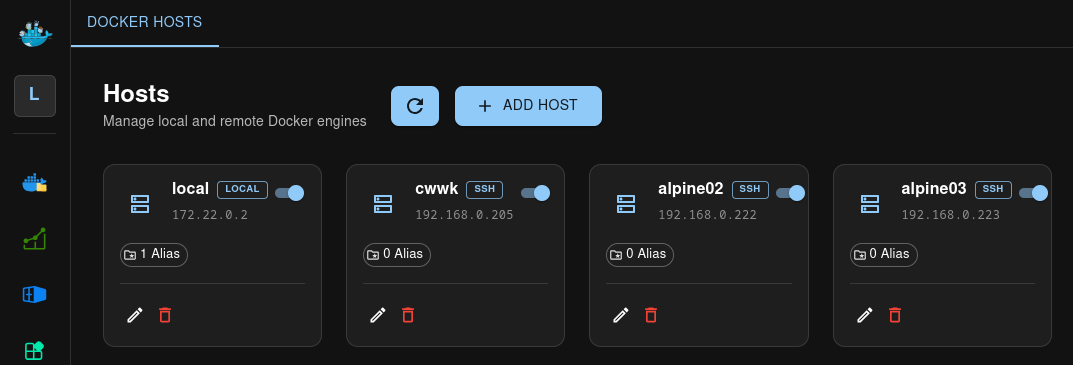
Le même jeu de clé est utilisé pour tous les hosts (.ssh/dockman-cwwk-rsa et .ssh/dockman-cwwk-rsa.pub)
A la création des hosts alpine02 et alpine03, les clés publiques ont été copiées, on peut remettre la connexion ssh à son état initial
Editer fichier /etc/ssh/sshd_config.d/10-rad.conf :
alpine02
1
2
Port = 55222
PasswordAuthentication no
alpine03
1
2
Port = 55223
PasswordAuthentication no
Redémarrer service
1
sudo service sshd restart
Authentification OIDC (OPTION)
Utilisation fournisseur OIDC Authelia
Configuration Authelia
Créer le client ‘dockman’ dans le fichier de configuration Authelia
1
2
3
4
5
6
7
8
9
10
11
12
13
      - client_id: 'dockman'
        client_name: 'dockman'
        client_secret: '<client_secret>'
        public: false
        authorization_policy: 'two_factor'
        redirect_uris:
          - 'https://dockman.home.arpa/api/auth/login/oidc/callback'
        scopes:
          - 'openid'
          - 'profile'
          - 'email'
        userinfo_signed_response_alg: 'none'
        token_endpoint_auth_method: 'client_secret_post'
client_secretdoit être la même valeur, en clair, que la variable pointé parDOCKMAN_AUTH_OIDC_CLIENT_SECRETdu fichier docker compose Dockman
Redémarrer Authelia
1
sudo systmectl restart authelia
Dockman oidc
Le fichier docker-compose.yml pour intégrer authentification OIDC
1
2
3
4
5
6
7
8
9
10
11
12
13
14
15
16
17
18
19
services:
  dockman:
    container_name: dockman
    image: ghcr.io/ra341/dockman:latest
    environment:
      - DOCKMAN_COMPOSE_ROOT=/sharenfs/docker-app/dockman/stacks
      - DOCKMAN_AUTH_ENABLE=true
      - DOCKMAN_AUTH_OIDC_ENABLE=true
      - DOCKMAN_AUTH_OIDC_ISSUER=https://auth.rnmkcy.eu
      - DOCKMAN_AUTH_OIDC_CLIENT_ID=dockman
      - DOCKMAN_AUTH_OIDC_CLIENT_SECRET=<client_secret>
      - DOCKMAN_AUTH_OIDC_REDIRECT_URL=https://dockman.home.arpa/api/auth/login/oidc/callback
    volumes:
      - /sharenfs/docker-app/dockman/stacks:/sharenfs/docker-app/dockman/stacks
      - /sharenfs/docker-app/dockman/config:/config
      - /var/run/docker.sock:/var/run/docker.sock
    ports:
      - "8866:8866"
    restart: always
client_secretdoit être identique à celle de la configuration client ‘dockman’ Authelia Pas de guillemets autour de DOCKMAN_AUTH_OIDC_CLIENT_SECRET dans docker-compose
Recharger le container
1
docker compose up -d
L’accès au lien https://dockman.home.arpa passera par une authentification à deux facteurs
- authentification Authelia via Login+Mot de passe
- Second facteur d’authentification, TOTP ou Yubikey
Créez /sharenfs/docker-app/dockman/config/oidc_client_secret contenant uniquement le client secret.
Le secret: /sharenfs/docker-app/dockman/config/oidc_client_secret
1
2
nano /sharenfs/docker-app/dockman/config/oidc_client_secret
chmod 600 /sharenfs/docker-app/dockman/config/oidc_client_secret
Variables docker-compose (ajoutez au service dockman)
Pour Dockman v3+ (callback avec /api) — remplacez client_secret_file par le chemin réel monté :
Le fichier docker-compose.yml modifié
1
2
3
4
5
6
7
8
9
10
11
12
13
14
15
16
17
18
19
20
21
22
23
services:
  dockman:
    container_name: dockman
    image: ghcr.io/ra341/dockman:latest
    environment:
      - DOCKMAN_COMPOSE_ROOT=/sharenfs/docker-app/dockman/stacks
      - DOCKMAN_AUTH_ENABLE=true
      - DOCKMAN_AUTH_USERNAME=admin
      - DOCKMAN_AUTH_PASSWORD=Mot_de_passe_admin
      - DOCKMAN_AUTH_PROVIDER=oidc
      - DOCKMAN_AUTH_OIDC_ISSUER=https://auth.rnmkcy.eu
      - DOCKMAN_AUTH_OIDC_CLIENT_ID=dockman
      - DOCKMAN_AUTH_OIDC_CLIENT_SECRET_FILE=/sharenfs/docker-app/dockman/config/oidc_client_secret
      - DOCKMAN_AUTH_OIDC_REDIRECT_URL=https://dockman.rnmkcy.eu/api/auth/login/oidc/callback
      - DOCKMAN_AUTH_ENABLE=true
    volumes:
      - /sharenfs/docker-app/dockman/stacks:/sharenfs/docker-app/dockman/stacks
      - /sharenfs/docker-app/dockman/config:/config
      - /var/run/docker.sock:/var/run/docker.sock
    ports:
      - "8866:8866"
    restart: always
auth.yaml minimal (montez dans /sharenfs/docker-app/dockman/config/auth.yaml)
1
nano /sharenfs/docker-app/dockman/config/auth.yaml
1
2
3
4
5
6
7
8
9
10
11
12
13
14
15
16
17
auth:
  provider: oidc
  oidc:
    issuer: "https://auth.rnmkcy.eu"
    client_id: "dockman"
    client_secret_file: "/config/oidc_client_secret"
    redirect_uris:
      - "https://dockman.rnmkcy.eu/api/auth/login/oidc/callback"
    scopes: ["openid","profile","email"]
    claim_mappings:
      username: "preferred_username"
      email: "email"
      groups: "groups"
    session:
      ttl: 3600
      cookie_name: "dockman_session"
dockman.rnmkcy.eu
Nginx — site dockman.rnmkcy.eu (ajoutez dans votre conf)
- Proxy principal + passthrough du callback et forward-auth via Authelia (vous avez déjà auth proxy pour auth.rnmkcy.eu)
C) Exemple nginx + Authelia snippet (bypass pour /agent/*)
1
2
3
4
5
6
7
8
9
10
11
12
13
14
15
16
17
18
19
20
21
22
23
24
25
26
27
28
29
30
31
32
33
34
35
36
37
38
39
40
41
42
43
44
45
46
47
48
49
50
51
52
53
54
55
56
57
58
59
60
61
62
63
64
65
66
67
68
69
70
71
72
73
74
75
76
77
server {
 listen 80;
 listen [::]:80;
 server_name dockman.rnmkcy.eu;
 return 301 https://$host$request_uri;
}

server {
 listen 443 ssl;
 listen [::]:443 ssl;
 http2 on;
 server_name dockman.rnmkcy.eu;

    include /etc/nginx/conf.d/ssl-modern.inc;

# security headers (optionnel)
add_header X-Frame-Options DENY;
add_header X-Content-Type-Options nosniff;
add_header Referrer-Policy "no-referrer-when-downgrade";

# include common auth snippet (defines auth_request and proxy_set_header Remote-User/Groups)
include /etc/nginx/snippets/auth.conf;

# --- Agent API locations: bypass Authelia and proxy directly to backend ---
location ~ ^/(agent/.*|api/agents.*|api/endpoints.*) {
    proxy_pass http://127.0.0.1:8866;
    proxy_set_header Host $host;
    proxy_set_header X-Real-IP $remote_addr;
    proxy_set_header X-Forwarded-For $proxy_add_x_forwarded_for;
    proxy_set_header X-Forwarded-Proto $scheme;
    proxy_http_version 1.1;
    proxy_set_header Upgrade $http_upgrade;
    proxy_set_header Connection "upgrade";
}

# --- UI / tout le reste : protégé par Authelia ---
location / {
    auth_request /authelia;                     # interne -> défini ci-dessous (snippet/authelia.conf)
    auth_request_set $target_url $scheme://$http_host$request_uri;
    auth_request_set $user $upstream_http_remote_user;
    auth_request_set $groups $upstream_http_remote_groups;

    # forward auth info to backend
    proxy_set_header Remote-User $user;
    proxy_set_header Remote-Groups $groups;

    proxy_set_header Host $host;
    proxy_set_header X-Real-IP $remote_addr;
    proxy_set_header X-Forwarded-For $proxy_add_x_forwarded_for;
    proxy_set_header X-Forwarded-Proto $scheme;
    proxy_http_version 1.1;
    proxy_set_header Upgrade $http_upgrade;
    proxy_set_header Connection "upgrade";

    proxy_pass http://127.0.0.1:8866;
}

# Internal Authelia verify location (do not expose)
location = /authelia {
    internal;
    proxy_pass_request_body off;
    proxy_set_header Content-Length "";
    proxy_set_header Host $host;
    proxy_set_header X-Original-URL $scheme://$http_host$request_uri;
    proxy_set_header X-Forwarded-Proto $scheme;
    proxy_set_header X-Forwarded-Host $http_host;
    proxy_set_header X-Forwarded-Uri $request_uri;
    proxy_set_header X-Forwarded-For $proxy_add_x_forwarded_for;
    proxy_set_header X-Real-IP $remote_addr;
    proxy_pass http://127.0.0.1:9091/api/verify;
    proxy_read_timeout 10s;
}

# Optional: custom 401 redirect to Authelia portal (auth.conf already sets it)
# error_page 401 =302 https://auth.rnmkcy.eu/?rd=$target_url*

}
configuration Authelia, client dockman
1
2
3
4
5
6
7
8
9
10
11
12
13
14
     - client_id: 'dockman'
        client_name: 'dockman'
        client_secret: '$pbkdf2-xxxxxxxxxxxxxxxxxxxxxA'
        public: false
        authorization_policy: 'two_factor'
        redirect_uris:
          - 'https://dockman.rnmkcy.eu/api/auth/login/oidc/callback'
        scopes:
          - 'openid'
          - 'profile'
          - 'email'
        userinfo_signed_response_alg: 'none'
        token_endpoint_auth_method: 'client_secret_post'