⌚WatchTower - Automatiser les mises à jour conteneur docker
Installer watchtower avec envoi notification lorsqu’une mise à jour a été effectuée (notification ntfy privée avec token ntfy.rnmkcy.eu/yan_infos)
Portainer
on va configurer Watchtower pour appeler votre endpoint Apprise après une mise à jour.
Voici les étapes concises pour désinstaller le conteneur Watchtower, si existant, et le remplacer par une instance gérée par docker-compose.
1
2
3
4
# Arrêter
docker stop watchtower
# Supprimer
docker rm watchtower
si lancé avec --restart always, l’arrêt puis la suppression suffit
Ouvrir Portainer en administration
Dans chaque environnement de tpe Alpine Linux, ajouter une Stack nommé watchtower avec le contenu docker compose suivant
1
2
3
4
5
6
7
8
9
10
11
12
13
services:
  watchtower:
    image: nickfedor/watchtower:latest
    container_name: watchtower
    restart: unless-stopped
    volumes:
      - /var/run/docker.sock:/var/run/docker.sock
    environment:
      - WATCHTOWER_NOTIFICATIONS=shoutrrr
      - WATCHTOWER_NOTIFICATION_URL=ntfy://:TOKEN@ntfy.rnmkcy.eu/yan_infos?title=WatchtowerUpdates
      - WATCHTOWER_NOTIFICATION_LEVEL=info
      - WATCHTOWER_CLEANUP=true
      - WATCHTOWER_SCHEDULE=0 25 4 * * *
- Remplacer
TOKENpar la clé ntfy et modifier l’heure de déclenchement25 4qui correspond à4h25du matin - Lancer la Création/Mise à jour du stack ,
Actions -> Deploy the stack/Update the stack
Pour un test manuel dans Portainer, inutile d’utiliser
docker compose exec: ouvrez Containers → watchtower → Console pour accéder au conteneur. Cela dit, l’image Watchtower n’inclut pas forcément un shell ou la commandeshoutrrr, donc le test direct avec un conteneur temporaire reste plus fiable.
Pour lancer un cycle Watchtower ponctuel depuis Portainer, le plus simple est de créer temporairement un second service dans votre stack, avec la même configuration ntfy, mais en ajoutant --run-once :
1
2
3
4
5
6
7
8
9
10
11
services:
  watchtower-test:
    image: nickfedor/watchtower:latest
    volumes:
      - /var/run/docker.sock:/var/run/docker.sock
    environment:
      WATCHTOWER_NOTIFICATIONS: shoutrrr
      WATCHTOWER_NOTIFICATION_URL: "ntfy://:TOKEN@ntfy.rnmkcy.eu/yan_infos?title=WatchtowerTest"
      WATCHTOWER_NOTIFICATION_LEVEL: info
    command: --run-once
    restart: "no"
Remplacez
TOKENpar votre token, puis déployez la stack. Une fois le conteneurwatchtower-testterminé, consultez ses logs et vérifiez ntfy. Le cycle peut ne pas générer de notification s’il n’y a aucun événement à signaler ; pour tester uniquement la livraison, envoyez plutôt un message de test avec Shoutrrr depuis un autre conteneur temporaire.
Évitez de faire tourner simultanément deux instances Watchtower en mode planifié. Ici, le second service est ponctuel (
--run-once), et vous pouvez le retirer de la stack après le test.
La notification envoyée n’est pas très explicite
1
2
3
4
5
6
09/10/2026 07:48
Watchtower updates on c991a675c5a9

Found new image: portainer/agent:latest (4c81dfcb3acc)
Stopped stale container: portainer_agent (0ce01a4f2ecb)
Started new container: portainer_agent (f23b4a2a4414)
Pour remplacer Watchtower updates on c991a675c5a9 par un titre fixe, ajoutez WATCHTOWER_NOTIFICATION_SKIP_TITLE=true. Ainsi, Watchtower ne remplacera pas le title défini dans l’URL ntfy.
1
2
3
4
environment:
  WATCHTOWER_NOTIFICATIONS: shoutrrr
  WATCHTOWER_NOTIFICATION_URL: "ntfy://:TOKEN@ntfy.rnmkcy.eu/yan_infos?title=Watchtower%20-%20Mises%20%C3%A0%20jour"
  WATCHTOWER_NOTIFICATION_SKIP_TITLE: "true"
Le titre affiché sera alors Watchtower - Mises à jour. Gardez le nom d’hôte dynamique si vous avez plusieurs serveurs à distinguer.
Solution adoptée, ajouter une ligne dans le stack watchtower: WATCHTOWER_NOTIFICATIONS_HOSTNAME: machine et remplacée par exemple machine par alpine01
1
2
3
4
5
6
7
8
9
10
11
12
services:
  watchtower-test:
    image: nickfedor/watchtower:latest
    volumes:
      - /var/run/docker.sock:/var/run/docker.sock
    environment:
      WATCHTOWER_NOTIFICATIONS_HOSTNAME: alpine01
      WATCHTOWER_NOTIFICATIONS: shoutrrr
      WATCHTOWER_NOTIFICATION_URL: "ntfy://:TOKEN@ntfy.rnmkcy.eu/yan_infos?title=WatchtowerTest"
      WATCHTOWER_NOTIFICATION_LEVEL: info
    command: --run-once
    restart: "no"
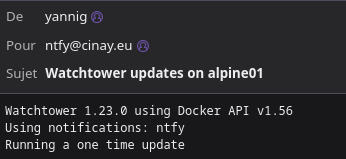
Le résultat du test est plus parlant
1
2
3
4
5
6
09/10/2026 08:00
Watchtower updates on alpine01

Watchtower 1.23.0 using Docker API v1.56
Using notifications: ntfy
Running a one time update
Avec envoi message en plus
1
WATCHTOWER_NOTIFICATION_URL: "ntfy://:TOKEN@ntfy.rnmkcy.eu/yan_infos?title=WatchtowerTest&email=ntfy%40cinay.eu"
Configuration watchtower
Le fichier docker compose pour watchtower avec envoi notification et message via ntfy
1
2
3
4
5
6
7
8
9
10
11
12
13
14
services:
  watchtower:
    image: nickfedor/watchtower:latest
    container_name: watchtower
    restart: unless-stopped
    volumes:
      - /var/run/docker.sock:/var/run/docker.sock
    environment:
      - WATCHTOWER_NOTIFICATIONS_HOSTNAME=machine
      - WATCHTOWER_NOTIFICATIONS=shoutrrr
      - WATCHTOWER_NOTIFICATION_URL=ntfy://:TOKEN@ntfy.rnmkcy.eu/yan_infos?title=WatchtowerUpdates&email=ntfy%40cinay.eu
      - WATCHTOWER_NOTIFICATION_LEVEL=info
      - WATCHTOWER_CLEANUP=true
      - WATCHTOWER_SCHEDULE=0 25 4 * * *
Remplacer machine par alpine01 et TOKEN par celui de ntfy
Portainer NON INSTALLE
Machine cwwk
Création fichier docker-compose.yml dans le dossier $HOME/sharenfs/docker-app
1
2
mkdir -p $HOME/sharenfs/docker-app/watchtower
nano $HOME/sharenfs/docker-app/watchtower/docker-compose.yml
Autres Machines
Création fichier docker-compose.yml dans le dossier $HOME/watchtower
1
2
mkdir -p $HOME/watchtower
nano $HOME/watchtower/docker-compose.yml
C- Ajouter le contenu suivant et sauvegarder
1
2
3
4
5
6
7
8
9
10
11
12
13
services:
  watchtower:
    image: nickfedor/watchtower:latest
    container_name: watchtower
    restart: unless-stopped
    volumes:
      - /var/run/docker.sock:/var/run/docker.sock
    environment:
      - WATCHTOWER_NOTIFICATIONS=shoutrrr
      - WATCHTOWER_NOTIFICATION_URL=ntfy://:tk_xxxxxxxxxxxxxxxxxxxxxxxxxxx@ntfy.rnmkcy.eu/yan_infos?title=WatchtowerUpdates
      - WATCHTOWER_NOTIFICATION_LEVEL=info
      - WATCHTOWER_CLEANUP=true
      - WATCHTOWER_SCHEDULE=0 25 4 * * *
Remplacer
tk_xxxxxxxxxxxxxxxxxxxxxxxxxxxpar votre<TOKEN>
Pour exécuter Watchtower tous les jours à 4h25 du matin, on a ajouté la variableWATCHTOWER_SCHEDULEavec le format Cron
Email + Priority (A TESTER)
A-Comment ajouter l’envoi d’un mail ("X-Email: ntfy@cinay.eu") dans WATCHTOWER_NOTIFICATION_URL
Ajoutez l’en-tête X-Email dans l’URL ntfy en l’encodant comme paramètre d’URL ; ntfy accepte les headers via query param nommé headers. Exemple pour ajouter “X-Email: ntfy@cinay.eu” :
- Remplacez le
WATCHTOWER_NOTIFICATION_URLpar : ntfy://:tk_xxxxxxxxxxxxxxxxxxxxxxxxxxx@ntfy.rnmkcy.eu/yan_infos?title=WatchtowerUpdates&headers=X-Email%3Antfy%40cinay.eu
Exemple complet dans le compose :
1
      - WATCHTOWER_NOTIFICATION_URL=ntfy://:tk_xxxxxxxxxxxxxxxxxxxxxxxxxxx@ntfy.rnmkcy.eu/yan_infos?title=WatchtowerUpdates&headers=X-Email%3Antfy%40cinay.eu
Notes :
%3A=:,%40=@(URL-encoding requis).- Si vous voulez plusieurs en-têtes, séparez-les par
,et encodez la virgule si nécessaire.
B-ajouter -H "Priority: low"
Ajoutez-le comme un en-tête supplémentaire dans le paramètre headers, en URL-encodant : et les séparateurs. Exemple avec les deux en-têtes :
- Valeur décodée des headers : X-Email: ntfy@cinay.eu, Priority: low
- URL-encodée (
,-> %2C,:-> %3A,@-> %40) : headers=X-Email%3Antfy%40cinay.eu%2CPriority%3A%20low
Ligne complète X-Email+Priority :
1
      - WATCHTOWER_NOTIFICATION_URL=ntfy://:tk_xxxxxxxxxxxxxxxxxxxxxxxxxxx@ntfy.rnmkcy.eu/yan_infos?title=WatchtowerUpdates&headers=X-Email%3Antfy%40cinay.eu%2CPriority%3A%20low
Lancer via docker-compose
Depuis le répertoire où est le docker-compose.yml :
1
2
3
# Machine cwwk
cd $HOME/sharenfs/docker-app/watchtower
docker compose up -d
1
2
3
# Autres Machines
cd $HOME/watchtower
docker compose up -d
(ou docker-compose up -d selon votre installation)
Vérifications
Pour vérifier la réception, le plus simple est d’envoyer un message de test directement depuis le conteneur Watchtower :
1
docker compose exec watchtower sh
Si l’image ne contient pas de shell ou l’outil Shoutrrr, lancez un conteneur Shoutrrr temporaire :
1
2
3
docker run --rm nickfedor/shoutrrr:latest send \
  --url 'ntfy://:VOTRE_TOKEN@ntfy.rnmkcy.eu/yan_infos' \
  --message 'Test ntfy depuis Shoutrrr'
Remplacez le token par le vôtre, puis vérifiez que le message arrive dans l’application ntfy abonnée à yan_infos. Shoutrrr documente cette commande send pour tester l’envoi.
Vous pouvez aussi déclencher un cycle Watchtower immédiatement, sans attendre 04:25 :
1
docker compose run --rm watchtower --run-once
Cela effectue une vérification ponctuelle et peut envoyer une notification au démarrage ou lors d’un événement pertinent. Pour un test reproductible, le test Shoutrrr direct est préférable : un cycle Watchtower peut ne rien signaler s’il n’y a aucune mise à jour. La documentation indique que Watchtower envoie une notification au démarrage.
Petite correction utile pour le titre : ajoutez
WATCHTOWER_NOTIFICATION_SKIP_TITLE=truesi vous voulez conserver letitle=WatchtowerUpdatesfourni dans l’URL ntfy.
Vérifier les logs
1
2
# Vérifier les logs
docker logs watchtower
Logs
1
2
3
time="2026-06-13T13:01:37Z" level=info msg="Watchtower 1.18.1 using Docker API v1.54"
time="2026-06-13T13:01:37Z" level=info msg="Using notifications: ntfy"
time="2026-06-13T13:01:37Z" level=info msg="Next scheduled run: 2026-06-14 04:25:00 UTC in 15 hours 23 minutes 22 seconds"
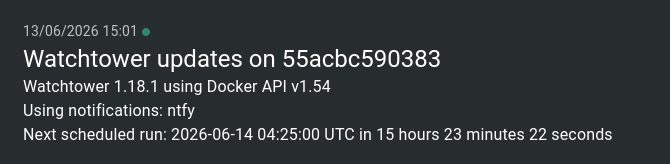
La notification ntfy