🟢 Proxmox vm105 Debian 13 + Jekyll Chirpy
Proxmox VM Debian
Accéder au terminal proxmox , en root.
Créer VM debian
Ligne de commande pour créer un VM à partir d’une image ISO Debian 13
1
2
3
4
5
6
7
8
9
10
11
12
13
14
15
16
qm create 105 \
  --name jekyll-chirpy \
  --ostype l26 \
  --machine q35 \
  --bios ovmf \
  --cpu host \
  --cores 2 \
  --memory 2048 \
  --balloon 2048 \
  --net0 virtio,bridge=vmbr0,firewall=1 \
  --scsihw virtio-scsi-single \
  --scsi0 local-lvm:15,cache=writeback,discard=on,iothread=1 \
  --ide2 local:iso/debian-13.6.0-amd64-netinst.iso,media=cdrom \
  --boot 'order=ide2;scsi0' \
  --agent enabled=1 \
  --efidisk0 local-lvm:1,efitype=4m
Déroulement de la commande
1
2
3
4
5
6
7
8
9
10
  Rounding up size to full physical extent 4.00 MiB
  Logical volume "vm-105-disk-0" created.
  Logical volume pve/vm-105-disk-0 changed.
transferred 0.0 B of 528.0 KiB (0.00%)
transferred 528.0 KiB of 528.0 KiB (100.00%)
transferred 528.0 KiB of 528.0 KiB (100.00%)
efidisk0: successfully created disk 'local-lvm:vm-105-disk-0,efitype=4m,size=4M'
  Logical volume "vm-105-disk-1" created.
  Logical volume pve/vm-105-disk-1 changed.
scsi0: successfully created disk 'local-lvm:vm-105-disk-1,cache=writeback,discard=on,iothread=1,size=15G'
Astuce CLI, qm set
Vous n’avez pas besoin de tout spécifier à la création. Créez d’abord la VM minimale, puis modifiez-la avec qm set :
1
2
3
qm create 105 --name debian13-test
qm set 105 --cores 4
qm set 105 --memory 4096
Proxmox vm 105
Proxmox, ouvrir la console de la vm 105
1
2
3
4
5
6
7
install
French, France, Français
debian
root49
debjek/debjek49
SSH et système
A la fin de l’installation
- stopper la vm 105
- changer l’ordre d’amorçage
- démarrer la vm 105
- Ouvrir une console NoVnc
- Se connecter en root sur la debian
Mise à jour debian
1
2
3
apt update && apt upgrade
# Installer sudo
apt install sudo
Droits
1
2
# droits root
echo "debjek ALL=(ALL) NOPASSWD: ALL" >> /etc/sudoers.d/10-debjek
Les outils
1
apt install openssh-server fdisk cloud-guest-utils rsync tmux
Locales
Vérification locales
1
2
locale
locale -a
On doit voir apparaître fr_FR.utf8
Si pa les bonnes locales
1
sudo dpkg-reconfigure locales
Choisir la locale par défaut (ex: fr_FR.UTF-8), puis OK.
Europe/Paris
Vérifier
1
timedatectl
Sinon, activer le fuseau Europe/Paris
1
sudo timedatectl set-timezone Europe/Paris
Horloge système synchronisée : timedatectl
1
2
3
4
5
6
7
               Local time: Sat 2026-07-25 17:21:50 CEST
           Universal time: Sat 2026-07-25 15:21:50 UTC
                 RTC time: Sat 2026-07-25 15:21:50
                Time zone: Europe/Paris (CEST, +0200)
System clock synchronized: yes
              NTP service: active
          RTC in local TZ: no
Réseau
Quel réseau est installé
1
systemctl list-unit-files | grep -Ei 'networkmanager|systemd-networkd|ifupdown|networking'
systemd-network est installé
1
2
systemctl is-active systemd-networkd
systemctl status systemd-networkd --no-pager
ifupdown
Modifier le fichier /etc/network/interfaces
1
2
3
4
5
allow-hotplug ens18
iface ens18 inet static
  address 192.168.0.229/24
  gateway 192.168.0.254
  dns-nameservers 192.168.0.205 1.1.1.1
Vérifier réseau
Mise à jour
1
2
sudo apt update
sudo apt upgrade
Problème de résolution DNS
1
Attention : Impossible de récupérer http://deb.debian.org/debian/dists/trixie/InRelease  Erreur temporaire de résolution de « deb.debian.org »
Teste :
1
2
getent hosts deb.debian.org
sudo apt update
Ensuite installe resolvconf :
1
sudo apt install resolvconf
Puis vérifie que la directive est bien présente :
1
2
3
4
5
allow-hotplug ens18
iface ens18 inet static
    address 192.168.0.229/24
    gateway 192.168.0.254
    dns-nameservers 1.1.1.1 9.9.9.9
Régénère /etc/resolv.conf :
1
2
sudo resolvconf -u
cat /etc/resolv.conf
Recharge l’interface :
1
2
sudo ifdown ens18 2>/dev/null
sudo ifup ens18
Historique commandes
Ajoutez la recherche d’historique de la ligne de commande au terminal
Se connecter en utilisateur debian
Tapez un début de commande précédent, puis utilisez shift + up (flèche haut) pour rechercher l’historique filtré avec le début de la commande.
1
2
3
# Global, tout utilisateur
echo '"\e[1;2A": history-search-backward' | sudo tee -a /etc/inputrc
echo '"\e[1;2B": history-search-forward' | sudo tee -a /etc/inputrc
Se déconnecter pour prise en compte
SSH + Clés
A-Sur le poste appelant
Générer un jeu de clé
1
ssh-keygen -t ed25519 -o -a 100 -f ~/.ssh/vm-105
Envoyer la clé publique sur le container lxc
1
ssh-copy-id -i ~/.ssh/vm-105.pub debjek@192.168.0.229
B-Sur le distant
1
2
3
4
echo 'Port = 55229
PasswordAuthentication no' | sudo tee /etc/ssh/sshd_config.d/10-user.conf
# Redémarrer sshd
sudo systemctl restart sshd
C-Sur le poste appelant
Lancer la connexion SSH avec clé
1
ssh -p 55229 -i ~/.ssh/vm-105 debjek@192.168.0.229
Motd
1
sudo rm -f /etc/motd && sudo nano /etc/motd
Contenu motd
1
2
3
4
5
6
7
8
9
10
11
12
13
  ___                                               _   __   ___
 | _ \ _ _  ___ __ __ _ __   ___ __ __ __ __ _ __  / | /  \ | __|
 |  _/| '_|/ _ \\ \ /| '  \ / _ \\ \ / \ V /| '  \ | || () ||__ \
 |_|  |_|  \___//_\_\|_|_|_|\___//_\_\  \_/ |_|_|_||_| \__/ |___/
    _       _          _  _       _          _    _
   (_) ___ | |__ _  _ | || |  ___| |_  __ _ | |_ (_) __
   | |/ -_)| / /| || || || | (_-<|  _|/ _` ||  _|| |/ _|
  _/ |\___||_\_\ \_, ||_||_| /__/ \__|\__,_| \__||_|\__|
 |__/            |__/
  _  ___  ___     _   __  ___     __     ___  ___  ___
 / |/ _ \|_  )   / | / / ( _ )   /  \   |_  )|_  )/ _ \
 | |\_, / / /  _ | |/ _ \/ _ \ _| () |_  / /  / / \_, /
 |_| /_/ /___|(_)|_|\___/\___/(_)\__/(_)/___|/___| /_/
NFS
Installer client NFS
1
sudo apt install nfs-common # debian
Créer le dossier
1
2
sudo mkdir -p /sharenfs
sudo chown $USER:$USER /sharenfs
Modifier le fichier /etc/fstab
1
192.168.0.205:/sharenfs /sharenfs nfs nofail,x-systemd.automount,x-systemd.device-timeout=10s 0 0
Recharger
1
2
sudo systemctl daemon-reload
sudo mount -a
Outils
1
sudo apt install curl rsync tree jq figlet
node
1
2
curl -o- https://raw.githubusercontent.com/nvm-sh/nvm/master/install.sh | bash
source ~/.bashrc
Installer node LTS
1
nvm install --lts
Versions installée node -v && npm -v
1
2
v24.19.0
11.17.0
Proxmox - Sauvegarde
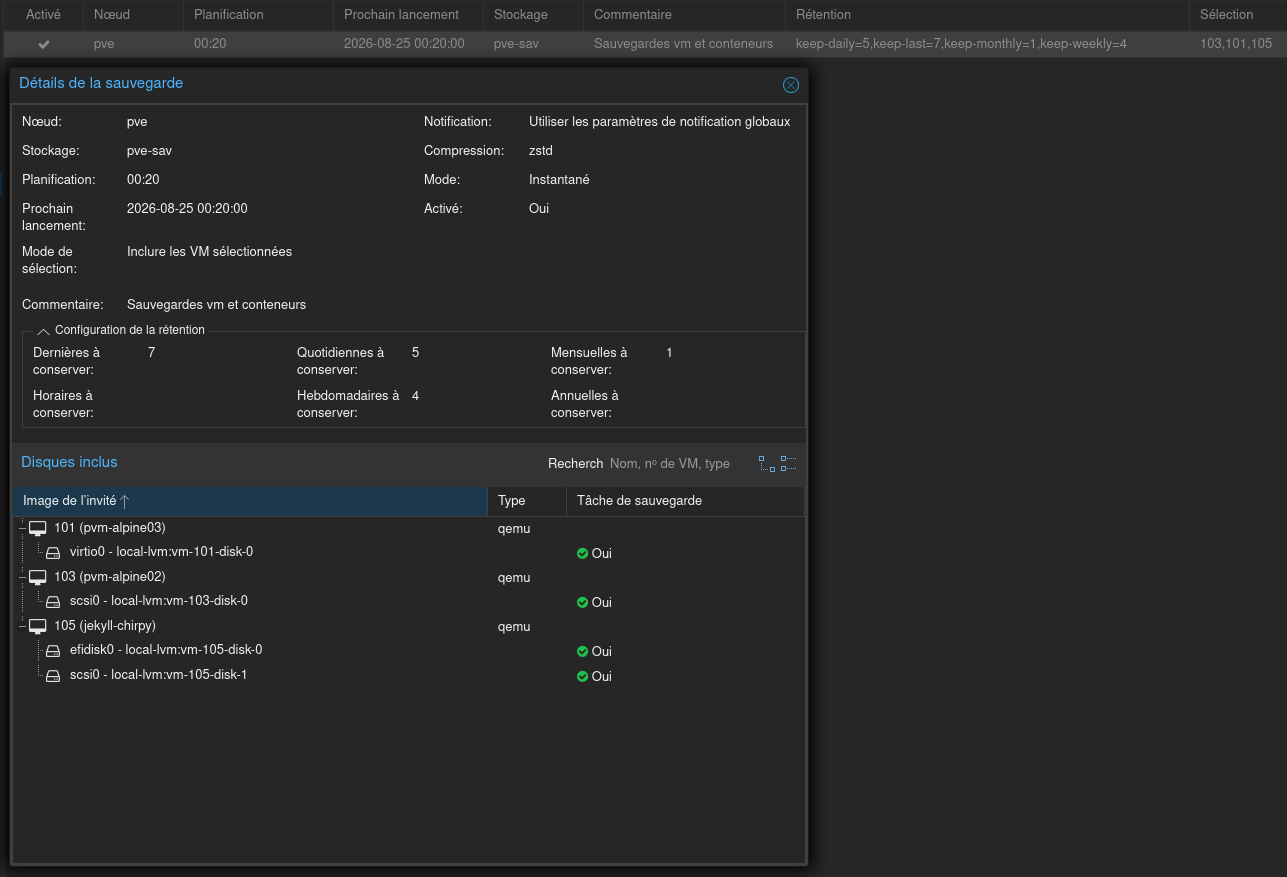
Sauvegarde de la vm 105: Centre de données -> Sauvegarde
🧪jekyll-theme-chirpy
Prérequis
Installer git et imagemagick
1
sudo apt install git #imagemagick
Jekyll debian
Installation jekyll sur debian
1
2
3
4
5
6
sudo apt install ruby-full build-essential zlib1g-dev -y
echo '# Install Ruby Gems to ~/gems' >> ~/.bashrc
echo 'export GEM_HOME="$HOME/gems"' >> ~/.bashrc
echo 'export PATH="$HOME/gems/bin:$PATH"' >> ~/.bashrc
source ~/.bashrc
gem install jekyll bundler
Cloner dépôt jekyll-theme-chirpy
Sur le home
1
2
3
4
5
6
7
8
9
cd ~
git clone https://forgejo.rnmkcy.eu/yannig/chirpy.git chirpy
cd ~/chirpy
# Créer les dossiers
mkdir files
mkdir _posts
mkdir images
# Install gems
bundle install
chirpy.service
Vérifier les chemins utilisés , manuellement
1
2
3
4
command -v bash
command -v bundle
command -v ruby
command -v jekyll
Réponse
1
2
3
4
/usr/bin/bash
/home/debjek/gems/bin/bundle
/usr/bin/ruby
/home/debjek/gems/bin/jekyll
Créer un service utilisateur chirpy.service en tenant compte des éléments précédents
1
2
mkdir -p $HOME/.config/systemd/user
nano $HOME/.config/systemd/user/chirpy.service
Ajouter ce qui suit
1
2
3
4
5
6
7
8
9
10
11
12
13
14
15
16
17
18
19
20
[Unit]
Description=Jekyll serve pour Chirpy sur vm105
After=network.target

[Service]
Type=simple
WorkingDirectory=/home/debjek/chirpy

Environment="HOME=/home/debjek"
Environment="GEM_HOME=/home/debjek/gems"
Environment="GEM_PATH=/home/debjek/gems"
Environment="PATH=/home/debjek/gems/bin:/usr/local/bin:/usr/bin:/bin"

ExecStart=/home/debjek/gems/bin/bundle exec jekyll build --watch

Restart=on-failure
RestartSec=5

[Install]
WantedBy=default.target
Après création
1
2
systemctl --user daemon-reload
systemctl --user enable chirpy.service --now
Vérifier :
1
2
systemctl --user status chirpy.service
journalctl --user -u chirpy.service -f
Rebuild chirpy
Script qui recrée entièrement le site statique
jekyll build, puis synchronise_siteavec les sites distants puis redémarre le servicechirpy
- arrêt propre du service (en réutilisant ta boucle d’attente)
jekyll buildvia le binaire du GEM (comme dans ton service)- un peu de robustesse sur
rsync.
Créer un script pour un rebuild complet: ~/chirpy/tools/rebuild-chirpy.sh
1
2
3
4
5
6
7
8
9
10
11
12
13
14
15
16
17
18
19
20
21
22
23
24
25
26
27
28
29
30
31
32
33
34
35
36
37
38
39
40
41
42
43
44
45
46
47
48
49
50
51
#!/usr/bin/env bash
set -euo pipefail

SERVICE_NAME="chirpy.service"
PATH_NAME="chirpy-rsync.path"
SITE_DIR="$HOME/chirpy"
JEKYLL_BIN="/home/debjek/gems/bin/jekyll"
RSYNC_SRC="/home/debjek/chirpy/_site/"
RSYNC_DEST="yick@192.168.0.205:/sharenfs/rnmkcy/chirpy/"
SSH_OPTS="-p 55205 -i /home/debjek/.ssh/cwwk-ed25519 -o StrictHostKeyChecking=accept-new"

echo "[$(date '+%F %T')] Passage dans $SITE_DIR"
cd "$SITE_DIR"

export PATH="/home/debjek/gems/bin:/usr/local/sbin:/usr/local/bin:/usr/sbin:/usr/bin:/sbin:/bin"
export GEM_HOME="/home/debjek/gems"
export GEM_PATH="/home/debjek/gems"

echo "[$(date '+%F %T')] Arrêt path utilisateur $PATH_NAME"
systemctl --user stop "$PATH_NAME" || true

echo "[$(date '+%F %T')] Arrêt service utilisateur $SERVICE_NAME"
systemctl --user stop "$SERVICE_NAME" || true

echo "[$(date '+%F %T')] Attente que $SERVICE_NAME soit vraiment stoppé"
for _ in {1..30}; do
  if systemctl --user is-active --quiet "$SERVICE_NAME"; then
    sleep 1
  else
    break
  fi
done
echo "[$(date '+%F %T')] Supprimer dossier _site"
sudo rm -r /home/debjek/chirpy/_site

echo "[$(date '+%F %T')] Construction: jekyll build"
"$JEKYLL_BIN" build

echo "[$(date '+%F %T')] Démarrage path utilisateur $PATH_NAME"
systemctl --user start "$PATH_NAME" || true

echo "[$(date '+%F %T')] Démarrage service utilisateur $SERVICE_NAME"
systemctl --user start "$SERVICE_NAME" || true

echo "[$(date '+%F %T')] Fin $0"

exit 0

echo "[$(date '+%F %T')] rsync vers $RSYNC_DEST"
echo "rsync -a --delete -e \"ssh $SSH_OPTS\" \"$RSYNC_SRC\" \"$RSYNC_DEST\""
rsync -a --delete -e "ssh $SSH_OPTS" "$RSYNC_SRC" "$RSYNC_DEST"
Points importants
- J’utilise
"$JEKYLL_BIN" buildpour être sûr d’utiliser le même Jekyll que celui du service systemd (binaire dans le GEM_HOME). - La commande
rsyncest inchangée dans son comportement, juste légèrement factorisée dans des variables pour faciliter les futurs changements. - Les timestamps dans les
echoaident à voir où ça passe du temps si un jour le build ou le rsync devient long.
Rendre exécutable
1
2
chmod +x ~/chirpy/tools/rebuild-chirpy.sh
sudo cp ~/chirpy/tools/rebuild-chirpy.sh  /usr/local/bin/rebuild-chirpy.sh
Synchro ‘_site’ distants
VM 105, synchroniser le dossier local
~/chirpy/_site/avec le(s) serveur(s) web distant(s)
A chaque création, modification ou suppression d’un POST mardown le sous-dossier_site/est reconstruit (jekyll build)
Clés SSH
Jeux de clés SSH pour la synchronisation du dossier
_siteavec les distants cwwk, Infomaniak, Contabo, Skrime
cwwk
Générer un jeu de clé pour le poste distant cwwk
1
ssh-keygen -t ed25519 -o -a 100 -f ~/.ssh/cwwk
Ajouter le contenu de la clé publique .ssh/cwwk.pub au fichier ~/.ssh/authorized_keys du distant cwwk
1
ssh-ed25519 AAAAC3NzaC1lZDI1NTE5AAAAICWCMgQIyXNeVIMYLMzmUPzNaMJRwbEU4Jin/BZ5HURZ debjek@debian
Tester la connexion ssh
1
ssh yick@192.168.0.205 -p 55205 -i .ssh/cwwk
Infomaniak
- Utilisateur: yiak
- IP: 83.228.219.134
- Port: 55134
Générer un jeu de clé pour le poste distant infomaniak
1
ssh-keygen -t ed25519 -o -a 100 -f ~/.ssh/infomaniak
Ajouter le contenu de la clé publique .ssh/infomaniak.pub au fichier ~/.ssh/authorized_keys du distant infomaniak
1
ssh-ed25519 AAAAC3NzaC1lZDI1NTE5AAAAIDhMRZfsByGlIAFiP9PkzqMPgzsK0yH+RdUjNEV6qtkS debjek@debian
Tester la connexion ssh
1
ssh yiak@83.228.219.134 -p 55134 -i .ssh/infomaniak
Contabo
Générer un jeu de clé pour le poste distant contabo
1
ssh-keygen -t ed25519 -o -a 100 -f ~/.ssh/contabo
Ajouter le contenu de la clé publique .ssh/contabo.pub au fichier ~/.ssh/authorized_keys du distant contabo
1
ssh-ed25519 AAAAC3NzaC1lZDI1NTE5AAAAICWCMgQIyXNeVIMYLMzmUPzNaMJRwbEU4Jin/BZ5HURZ debjek@debian
Tester la connexion ssh
1
ssh yair@144.91.89.149 -p 55149 -i .ssh/contabo
skrime
Générer un jeu de clé pour le poste distant skrime
1
ssh-keygen -t ed25519 -o -a 100 -f ~/.ssh/skrime
Ajouter le contenu de la clé publique .ssh/cwwk.pub au fichier ~/.ssh/authorized_keys du distant skrime
1
ssh-ed25519 AAAAC3NzaC1lZDI1NTE5AAAAICWCMgQIyXNeVIMYLMzmUPzNaMJRwbEU4Jin/BZ5HURZ debjek@debian
Tester la connexion ssh
1
ssh  skim@[2a14:7c0:1002:19a8::] -p 51002 -i .ssh/skrime
Script chirpy-rsync-sync.sh
Créer /usr/local/bin/chirpy-rsync-sync.sh (via sudo)
1
2
3
4
5
6
7
8
9
10
11
12
13
14
15
16
#!/usr/bin/env bash
# Distant cwwk
echo 'rsync cwwk'
rsync -a --delete -e "ssh -p 55205 -i /home/debjek/.ssh/cwwk -o StrictHostKeyChecking=accept-new"  /home/debjek/chirpy/_site/ yick@192.168.0.205:/sharenfs/rnmkcy/chirpy/
# Distant Infomaniak
#ssh yiak@83.228.219.134 -p 55134 -i .ssh/infomaniak
echo 'rsync infomaniak'
rsync -a --delete -e "ssh -p 55134 -i /home/debjek/.ssh/infomaniak -o StrictHostKeyChecking=accept-new"  /home/debjek/chirpy/_site/ yiak@83.228.219.134:/srv/media/chirpy/
# Distant contabo
#ssh yair@144.91.89.149 -p 55149 -i .ssh/contabo
echo 'rsync contabo'
rsync -a --delete -e "ssh -p 55149 -i /home/debjek/.ssh/contabo -o StrictHostKeyChecking=accept-new"  /home/debjek/chirpy/_site/ yair@144.91.89.149:/srv/media/chirpy/
# Distant skrime
#skim@2a14:7c0:1002:19a8:: -p 51002 -i .ssh/skrime
echo 'rsync skrime'
rsync -a --delete -e "ssh -p 51002 -i /home/debjek/.ssh/skrime -o StrictHostKeyChecking=accept-new"  /home/debjek/chirpy/_site/ skim@[2a14:7c0:1002:19a8::]:/srv/media/chirpy/
Puis :
1
sudo chmod +x /usr/local/bin/chirpy-rsync-sync.sh
Plugin Jekyll post_write
Solution recommandée: Jekyll fournit le hook
post_write, exécuté après l’écriture de tous les fichiers générés sur disque.
Configurer le hook pour écrire exclusivement dans ~/chirpy/tools/ et exécuter /usr/local/bin/chirpy-rsync-sync.sh après chaque génération. Le hook :site, :post_write est prévu pour intervenir après l’écriture du site généré
Créer _plugins/post_write.rb :
1
2
3
4
5
6
7
8
9
10
11
12
13
14
15
16
17
18
19
20
21
22
23
24
25
26
27
28
29
30
31
32
33
34
35
36
37
38
39
40
41
#!/usr/bin/env ruby

require "jekyll"
require "fileutils"
require "open3"
require "time"

site_root = File.expand_path("..", __dir__)
tools_dir  = File.join(site_root, "tools")
log_file   = File.join(tools_dir, "post_write.log")
script     = "/usr/local/bin/chirpy-rsync-sync.sh"

FileUtils.mkdir_p(tools_dir)

Jekyll::Hooks.register :site, :post_write do |site|
  timestamp = Time.now.iso8601

  File.open(log_file, "a") do |log|
    log.puts "[#{timestamp}] post_write démarré"
    log.puts "[#{timestamp}] destination=#{site.dest}"
  end

  stdout, stderr, status = Open3.capture3(script, site.dest)

  File.open(log_file, "a") do |log|
    log.puts "[#{timestamp}] stdout:"
    log.puts stdout unless stdout.empty?
    log.puts "[#{timestamp}] stderr:"
    log.puts stderr unless stderr.empty?
    log.puts "[#{timestamp}] statut=#{status.exitstatus}"
    log.puts "[#{timestamp}] post_write terminé"
    log.puts "-" * 60
  end

  unless status.success?
    Jekyll.logger.error "post_write:", "chirpy-rsync-sync.sh a échoué"
    raise "Échec de #{script}, code #{status.exitstatus}"
  end

  Jekyll.logger.info "post_write:", "chirpy-rsync-sync.sh exécuté avec succès"
end
Le journal sera écrit dans /home/debjek/chirpy/tools/post_write.log
Les plugins Ruby sont chargés au démarrage de Jekyll. Après modification du hook, relancer un jekyll build
1
rebuild-chirpy.sh
PC1 EndeavourOS
Les liens sur les dossiers statiques files et images
1
2
sudo ln -s /home/yann/media/statique/files /files
sudo ln -s /home/yann/media/statique/images /images
Alias sur PC1 pour reconstruction du site avec
jekyll build
alias chirpy='/home/yann/scripts/ssh-manager.sh vm105 exe '\''/usr/local/bin/rebuild-chirpy.sh'\'''
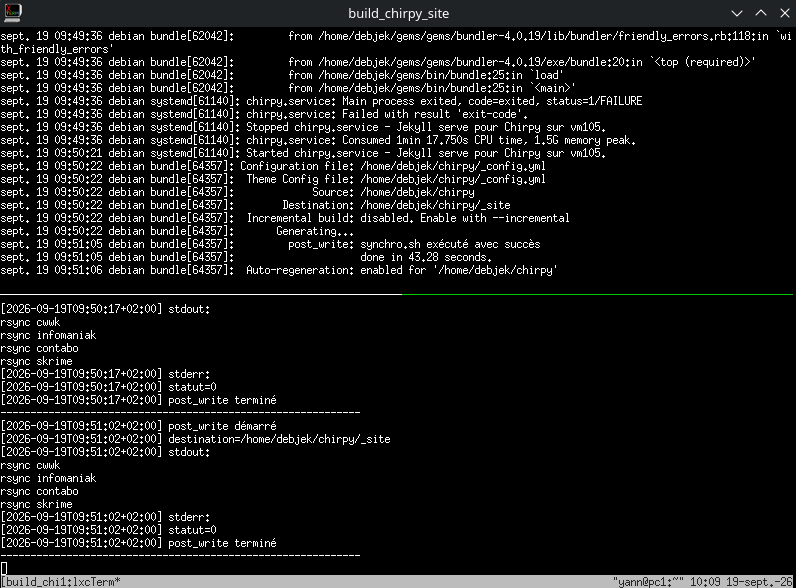
Surveillance des logs
/home/yann/scripts/build_chirpy_site.sh
1
2
3
4
5
6
7
8
9
10
11
12
13
14
15
16
17
18
19
20
21
22
23
24
25
26
27
28
29
30
31
32
33
34
35
36
37
38
39
40
#!/bin/bash

# COLUMNSxROWS+X+Y -> xterm -geometry 400x200+100+350
# xterm -rv -geometry 150x40+100+150 -T suivi_chirpy_site -e '/home/yann/scripts/suivi_chirpy_site.sh'
# On supprime la session "build_chirpy_site" si existante

if [[ `tmux list-sessions | grep 'build_chirpy_site' | wc -l` != 0 ]]
   then
       # On ferme la session active
       tmux kill-session -t build_chirpy_site
fi


# Créer une bannière dans /etc/motd sur chaque serveur
# Nom du domaine en ascii voir lien http://patorjk.com/software/taag/#p=display&h=1&f=Small
echo "fin fi"
# Créer session + terminal
tmux new  -d -s build_chirpy_site -n lxcTerm
# Séparation horizontale en 2 du terminal
tmux split-window -v -p 50
# | 0         |
# |           |
# |-----------|
# | 1         |
# |           |


# Sélection terminal HAUT
tmux selectp -t 0
tmux send-keys -t build_chirpy_site "/home/yann/scripts/ssh-manager.sh vm105 exe 'journalctl --user -u chirpy -f'" C-m
#tmux send-keys -t build_chirpy_site "journalctl --user -f -u hugo_chirpy_site.service" C-m
# Sélection terminal BAS
tmux selectp -t 1
tmux send-keys -t build_chirpy_site "journalctl --user -u surveiller-media.service -f" C-m

# Afficher la session
tmux a -t build_chirpy_site
#
# Tuer la session
# tmux kill-session -t build_chirpy_site
.local/share/applications/Build\ Chirpy.desktop
1
2
3
4
5
6
7
8
9
10
11
12
13
14
[Desktop Entry]
Comment=build_chirpy_site.sh
Exec=xterm -rv -geometry 200x20 -T build_chirpy_site -e /home/yann/scripts/build_chirpy_site.sh
Icon=project_rebuild-symbolic
Name=Build Chirpy
NoDisplay=false
Path=
PrefersNonDefaultGPU=false
StartupNotify=true
Terminal=false
TerminalOptions=
Type=Application
X-KDE-SubstituteUID=false
X-KDE-Username=
PC1 - Synchro dossiers files images et _posts
Linux EndeavourOS desktop, surveiller la création, modification et suppression de fichier dans les 3 répertoires $HOME/media/statique/{files,images,_posts} et déclencher l’exécution d’un bash de synchronisation avec une VM distante
Pour ce besoin, utilisez inotify, via inotifywait du paquet inotify-tools.
- inotify : idéal pour déclencher immédiatement un script lors de créations, modifications, suppressions ou déplacements.
- auditd : plutôt destiné à l’audit de sécurité et à la traçabilité — utilisateur, processus, appels système, journaux persistants. Il est plus lourd et moins pratique pour lancer directement une action.
inotify signale des événements système comme CREATE, CLOSE_WRITE, DELETE et MOVED_TO; attention, les événements de déplacement peuvent arriver en deux parties et ne sont pas atomiques.
Installer inotify-tools
1
sudo pacman -S inotify-tools
Créer le script de synchronisation
Exécuter ce dry-run : il affichera les fichiers qui seraient copiés, mis à jour ou supprimés, sans effectuer aucune modification.
1
2
3
4
5
6
7
for dir in files images _posts; do
  echo "=== Simulation : ${dir} ==="
  rsync -avzn --delete --itemize-changes \
    -e "ssh -p 55229 -i /home/yann/.ssh/vm-105" \
    "/home/yann/media/statique/${dir}/" \
    "debjek@192.168.0.229:/home/debjek/chirpy/${dir}/"
done
Lecture rapide du résultat
>f+++++++++ fichier: fichier qui serait ajouté sur le serveur.>f..t...... fichier: fichier qui serait mis à jour, par exemple parce que sa date diffère.*deleting fichier: fichier qui serait supprimé du serveur à cause de--delete.- Aucune ligne de changement : le dossier local et le dossier distant sont déjà synchronisés.
-n signifie --dry-run : ni copie ni suppression ne seront réalisées.
Créer le script de traitement :
1
2
mkdir -p /home/yann/bin
nano /home/yann/bin/traiter-media.sh
Contenu :
1
2
3
4
5
6
7
8
9
10
11
12
13
14
15
16
17
18
19
#!/usr/bin/env bash

set -u

# Empêche deux synchronisations simultanées
exec 9>/tmp/rsync-media-statique.lock

if ! flock -n 9; then
    echo "Une synchronisation est déjà en cours."
    exit 0
fi

for dir in files images _posts; do
  echo "=== Synchro : ${dir} ==="
  rsync -avz --delete --itemize-changes \
    -e "ssh -p 55229 -i /home/yann/.ssh/vm-105" \
    "/home/yann/media/statique/${dir}/" \
    "debjek@192.168.0.229:/home/debjek/chirpy/${dir}/"
done
Rendre le script exécutable :
1
chmod +x /home/yann/bin/traiter-media.sh
Cette commande synchronise :
1
2
3
/home/yann/media/statique/files/   → /home/debjek/chirpy/files/
/home/yann/media/statique/images/  → /home/debjek/chirpy/images/
/home/yann/media/statique/_posts/  → /home/debjek/chirpy/_posts/
Tester manuellement :
1
/home/yann/bin/traiter-media.sh
Créer le script de surveillance inotify
Créer le fichier :
1
nano /home/yann/bin/surveiller-media.sh
Contenu :
1
2
3
4
5
6
7
8
9
10
11
12
13
14
15
16
17
18
19
20
21
22
23
24
25
26
27
#!/usr/bin/env bash

set -u

WATCH_ROOT="/home/yann/media/statique"
SYNC_SCRIPT="/home/yann/bin/traiter-media.sh"

inotifywait \
    --monitor \
    --recursive \
    --format '%e|%w%f' \
    --event create \
    --event close_write \
    --event delete \
    --event moved_to \
    --event moved_from \
    "$WATCH_ROOT/files" \
    "$WATCH_ROOT/images" \
    "$WATCH_ROOT/_posts" |
while IFS='|' read -r events path; do
    echo "Événement détecté : $events — $path"

    # Petit délai pour éviter de réagir à des événements en rafale
    sleep 1

    "$SYNC_SCRIPT"
done
Rendre le script exécutable :
1
chmod +x /home/yann/bin/surveiller-media.sh
Tester au premier plan :
1
/home/yann/bin/surveiller-media.sh
Dans un autre terminal, créez ou modifiez un fichier :
1
touch /home/yann/media/statique/_posts/test.md
Vous devriez voir rsync s’exécuter. Arrêtez ensuite le test avec Ctrl+C.
Créer le service systemd utilisateur
Créer le répertoire si nécessaire :
1
mkdir -p /home/yann/.config/systemd/user
Créer le service :
1
nano /home/yann/.config/systemd/user/surveiller-media.service
Contenu :
1
2
3
4
5
6
7
8
9
10
11
[Unit]
Description=Surveillance et synchronisation des fichiers media

[Service]
Type=simple
ExecStart=/home/yann/bin/surveiller-media.sh
Restart=on-failure
RestartSec=2

[Install]
WantedBy=default.target
Activer le service
Recharger la configuration systemd utilisateur :
1
systemctl --user daemon-reload
Activer le service au démarrage de la session :
1
systemctl --user enable surveiller-media.service
Le démarrer immédiatement :
1
systemctl --user start surveiller-media.service
Ou, en une seule commande :
1
systemctl --user enable --now surveiller-media.service
Vérifier le fonctionnement
État du service :
1
systemctl --user status surveiller-media.service
Afficher les journaux en direct :
1
journalctl --user -u surveiller-media.service -f
Tester avec une modification :
1
echo "Test inotify" >> /home/yann/media/statique/_posts/test.md
Commandes d’administration
Arrêter le service :
1
systemctl --user stop surveiller-media.service
Redémarrer le service :
1
systemctl --user restart surveiller-media.service
Désactiver le démarrage automatique :
1
systemctl --user disable --now surveiller-media.service
Voir les événements détectés par inotify :
1
2
3
4
5
6
inotifywait \
    --monitor \
    --recursive \
    --format '%T %e %w%f' \
    --timefmt '%F %T' \
    /home/yann/media/statique/{files,images,_posts}
La chaîne finale est donc :
1
2
3
4
5
6
7
8
9
modification manuelle
        ↓
inotifywait
        ↓
surveiller-media.sh
        ↓
traiter-media.sh
        ↓
rsync vers le serveur distant
Annexe
Modifier les js de chirpy
Pour modifier le générateur de site statique
1
2
# Arrêter le service chirpy
systemctl --user stop chirpy.service
Construction du dossier _site , dans un terminal exécuter
1
2
cd ~/chirpy
./tools/run.sh
Le site est prêt
1
2
3
4
5
6
7
8
9
10
11
12
13
> bundle exec jekyll s -l -H 127.0.0.1

Configuration file: /home/debjek/chirpy/_config.yml
 Theme Config file: /home/debjek/chirpy/_config.yml
            Source: /home/debjek/chirpy
       Destination: /home/debjek/chirpy/_site
 Incremental build: disabled. Enable with --incremental
      Generating...
                    done in 30.269 seconds.
 Auto-regeneration: enabled for '/home/debjek/chirpy'
LiveReload address: http://127.0.0.1:35729
    Server address: http://127.0.0.1:4000/
  Server running... press ctrl-c to stop.
Dans un second terminal, exécuter
1
npm run watch:js
En cas d’erreur , il faut exécuter
npm install, patienter puis relancernpm run watch:js
Quand vous avez fini le développement, appuyez sur ctrl + C pour mettre fin au processus npm ci-dessus , puis exécuter la commande:
1
npm run build:js
Les nouveaux fichiers JS compressés seront exportés vers assets/js/dist/
Après les modifications
1
systemctl --user start chirpy.service
Recherche find
Les recherches find dans le dossier ~/chirpy
1
find . -type d \( -name node_modules -o -name .jekyll-cache -o -name _site -o -name .git -o -name assets  \) -prune -o -name "*" -type f -exec grep -Hn 'related-posts' {} \; |more
Amélioration “Recherche” 01/09/2023:
_includes/search-loader.html_data/origin/cors.ymlassets/lib/simple-jekyll-search/simple-jekyll-search.min.js
Surveiller modification ‘sitemap.xml’ (INACTIF)
Avec les unités de chemin, vous pouvez surveiller les fichiers et les répertoires pour certains événements. Si un événement spécifique se produit, une unité de service est exécutée, et elle porte généralement le même nom que l’unité de chemin
Nous allons surveiller dans le dossier local $HOME/chirpy/_site/ toute modification du fichier sitemap.xml qui entrainera l’exécution d’un script
Systemd Path chirpy-rsync.path
Dans le répertoire systemd utilisateur
créer une unité path ~/.config/systemd/user/chirpy-rsync.path
1
2
3
4
5
6
7
8
9
[Unit]
Description=Surveiller sitemap.xml pour les changements

[Path]
PathChanged=/home/debjek/chirpy/_site/sitemap.xml
Unit=chirpy-rsync.service

[Install]
WantedBy=default.target
Dans la section [Path], PathChanged= indique le chemin absolu du fichier à surveiller, tandis que Unit= indique l’unité de service à exécuter si le fichier change. Cette unité (chirpy-rsync.path) doit être lancée lorsque le système est en mode multi-utilisateur.
Service systemd chirpy-rsync.service
Créer l’unité de service correspondante, chirpy-rsync.service, dans le répertoire ~/.config/systemd/user/
Si le fichier sitemap.xml change (c’est-à-dire qu’il est à la fois écrit et fermé), l’unité de service suivante sera appelée pour exécuter le script spécifié :
Créer une unité service ~/.config/systemd/user/chirpy-rsync.service :
1
2
3
4
5
6
[Unit]
Description=Sync Jekyll _site to remote servers with rsync

[Service]
Type=oneshot
ExecStart=/usr/local/bin/chirpy-rsync-sync.sh
Activer/démarrer :
1
2
systemctl --user daemon-reload
systemctl --user enable --now chirpy-rsync.path
Vérifier
1
2
systemctl --user status chirpy-rsync.path
journalctl --user -u chirpy-rsync.service -f
Désactiver
1
2
systemctl --user stop chirpy-rsync.path
systemctl --user disable chirpy-rsync.path