Motorola moto g 5G plus
Motorola moto g 5G plus
codename: nairo
Variants
There are multiple variants of this device. Make sure you’re viewing the right one.
Downloads
Guides
- Installation
- Build for yourself
- Update to a newer build of the same LineageOS version
- Upgrade to a higher version of LineageOS (e.g. lineage-22.1 -> lineage-23.2)
Special boot modes
- Recovery: With the device powered off, hold Volume Down + Power, then select “Recovery mode” using Volume keys.
- Bootloader/Fastboot/Download: With the device powered off, hold Volume Down + Power.
Known quirks
Find help online
You can find assistance with LineageOS on our subreddit, on our Discord server, or in #LineageOS on Libera.Chat.
Report a bug
If you’d like to report a bug, follow the instructions here.
| | |
|—|—|
|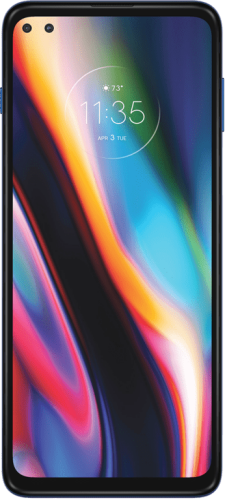
Motorola moto g 5G plus (nairo)| |
|Released|May 2020|
|Specifications| |
|SoC|Qualcomm SM7250 Snapdragon 765G|
|RAM|4/6/8 GB LPDDR4X|
|CPU|Octa-core Kryo 475
1 x 2.4 GHz + 1 x 2.2 GHz + 6 x 1.8 GHz|
|Architecture|arm64|
|GPU|Qualcomm Adreno 620|
|Network|- 2G GSM
- 2G CDMA
- 3G UMTS
- 4G LTE
- 5G NR|
|Storage|64/128 GB UFS 2.1|
|SD card|Up to 1 TB|
|Screen|6.7 in (170.18 mm)
1080x2520 (409 PPI)
IPS LTPS LCD|
|Bluetooth|5.1 with A2DP + aptX HD|
|Wi-Fi|802.11 a/b/g/n/ac|
|Peripherals|- 3.5mm jack
- A-GPS
- Accelerometer
- Compass
- Depth Sensor
- Dual SIM
- FM radio
- Fingerprint reader
- Galileo
- GLONASS
- GPS
- Google Assist Button
- Gyroscope
- Light sensor
- NFC
- Pedometer
- Proximity sensor
- USB OTG|
|Cameras|4
- 48 MP (wide), LED flash
- 8 MP (ultrawide), No flash
- 5 MP (macro), No flash
- 2 MP (depth), No flash|
|Dimensions|168.3 mm (6.63 in) (h)
74 mm (2.91 in) (w)
9.7 mm (0.38 in) (d)|
|Battery|Non-removable Li-Po 5000 mAh|
|LineageOS info| |
|Maintainers|- ItsVixano
- Ivanmeler
- SyberHexen
- zlewchan|
|Current version|- 23.2 (Android 16)|
|Kernel version|- 4.19 (source code)|
|Supported models|- XT2075-3
- help_outline Don’t see yours?|
|Previously supported versions|- 18.1 (Android 11)
- 19.1 (Android 12L)
- 20 (Android 13)
- 21 (Android 14)
- 22.1 (Android 15)
- 22.2 (Android 15)|
|Wiki metadata|- nairo_variant1.yml|
Upgrade LineageOS on
Motorola moto g 5G plus
nairo
Basic requirements
- Read through the instructions at least once before actually following them, so as to avoid any problems due to any missed steps!
- You actually want to upgrade your device to the newest version - if you wish to downgrade to an earlier version of LineageOS, follow your device’s instructions for installing LineageOS the first time.
warning
Warning: Your device needs a specific firmware version before proceeding.
If your device is currently using a newer or older version than the required version, please up- or downgrade to the required version before proceeding with your LineageOS installation.
The required version is Android 11, which may be lower than the LineageOS version you are about to install - this is not an error!
If there are multiple updates of that version (e.g. security updates), make sure to use the latest!
If you need to upgrade or downgrade your device, please search online for guides.
We are unable to provide specific instructions here and on our support platforms.
This requirement is already met when you are upgrading from LineageOS 20 or newer!
Manually upgrading LineageOS
info_outline
Note: Following these instructions will not wipe your data. It is, however, recommended to save important data before doing so, anyway!
The updater app does not support upgrades from one version of LineageOS to another, and will block installation to any update for a different version. Upgrading manually requires similar steps to installing LineageOS for the first time.
- Download the LineageOS zip file that you would like to install or build the package yourself.
- If you are currently using (or now want to use) an application package add-on such as Google Apps, you have the following options:
- keep using them: Download the appropriate version now (use the
arm64architecture) - remove them: You can only do so by performing a factory reset, which will also remove all your data.
- start using them: You can only do so by performing a factory reset, which will also remove all your data. Download the appropriate version now (use the
arm64architecture)
- keep using them: Download the appropriate version now (use the
- Make sure your computer has working
adb. Setup instructions can be found here. - Enable USB debugging on your device.
-
Run:
1
 adb -d reboot sideload
warning
Important: The device may reboot to a blank black screen, fear not, this is a known bug on some recoveries, proceed with the instructions.
-
Run (inserting the path to your LineageOS package):
1
 adb -d sideload /path/to/zip
check
Tip: Normally, adb reports
Total xfer: 1.00x, but in some cases, even if the process succeeds, the output may stop at 47% and showadb: failed to read command: Success. In other instances, it might displayadb: failed to read command: No errororadb: failed to read command: Undefined error: 0which is also fine.info_outline
Note: If signature verification fails, that means the image you are trying to flash is either corrupted, or not an official LineageOS image. Please redownload the image.
-
(Optionally): If you want to install any add-ons, click
Advanced, thenReboot to Recovery, then when your device reboots, clickApply update, thenApply from ADB, then run for each of those packages in sequence:1
adb -d sideload /path/to/zip
info_outline
Note: If you previously had any Google Apps add-on package installed on your device, you must install an updated package before the first boot of Android! If you did not have Google Apps installed, you must wipe the Data partition (or perform a factory reset) to install them.
info_outline
Note: Add-ons aren’t signed with LineageOS’s official key, and therefore when they are sideloaded, Lineage Recovery will present a screen that says
Signature verification failed, this is expected, please clickContinue. - Once you have installed everything successfully, click the back arrow in the top left of the screen, then “Reboot system now”.
Get assistance
After you’ve double checked that you followed the steps precisely, didn’t skip any and still have questions or got stuck, feel free to ask on our subreddit, on our Discord server, or in #LineageOS on Libera.Chat.