Bash tips couleurs et formatage
Bash tips: Colors and formatting (ANSI/VT100 Control sequences)
The ANSI/VT100 terminals and terminal emulators are not just able to display black and white text ; they can display colors and formatted texts thanks to escape sequences. Those sequences are composed of the Escape character (often represented by “^[” or “<Esc>”) followed by some other characters: “<Esc>[FormatCodem”.
In Bash, the <Esc> character can be obtained with the following syntaxes:
\e\033\x1B
Examples:
| Code (Bash) | Preview |
|---|---|
| echo -e “\e[31mHello World\e[0m” |  |
| echo -e “\033[31mHello\e[0m World” |  |
NOTE¹: The -e option of the echo command enable the parsing of the escape sequences.
NOTE²: The “\e[0m” sequence removes all attributes (formatting and colors). It can be a good idea to add it at the end of each colored text. ;)
NOTE³: The examples in this page are in Bash but the ANSI/VT100 escape sequences can be used in every programming languages.
Formatting
Here are the most commonly supported control sequences for formatting text. Their support depends on the used terminal (see the compatibility list).
Set
| Code | Description | Example | Preview |
|---|---|---|---|
| 1 | Bold/Bright | echo -e “Normal \e[1mBold” |  |
| 2 | Dim | echo -e “Normal \e[2mDim” |  |
| 4 | Underlined | echo -e “Normal \e[4mUnderlined” |  |
| 5 | Blink 1) | echo -e “Normal \e[5mBlink” |  |
| 7 | Reverse (invert the foreground and background colors) | echo -e “Normal \e[7minverted” |  |
| 8 | Hidden (useful for passwords) | echo -e “Normal \e[8mHidden” |  |
Reset
| Code | Description | Example | Preview |
|---|---|---|---|
| 0 | Reset all attributes | echo -e “\e[0mNormal Text” |  |
| 21 | Reset bold/bright | echo -e “Normal \e[1mBold \e[21mNormal” |  |
| 22 | Reset dim | echo -e “Normal \e[2mDim \e[22mNormal” |  |
| 24 | Reset underlined | echo -e “Normal \e[4mUnderlined \e[24mNormal” |  |
| 25 | Reset blink | echo -e “Normal \e[5mBlink \e[25mNormal” |  |
| 27 | Reset reverse | echo -e “Normal \e[7minverted \e[27mNormal” |  |
| 28 | Reset hidden | echo -e “Normal \e[8mHidden \e[28mNormal” |  |
8/16 Colors
The following colors works with most terminals and terminals emulators 2), see the compatibility list for more informations.
NOTE: The colors can vary depending of the terminal configuration.
Foreground (text)
| Code | Color | Example | Preview |
|---|---|---|---|
| 39 | Default foreground color | echo -e “Default \e[39mDefault” |  |
| 30 | Black | echo -e “Default \e[30mBlack” |  |
| 31 | Red | echo -e “Default \e[31mRed” |  |
| 32 | Green | echo -e “Default \e[32mGreen” |  |
| 33 | Yellow | echo -e “Default \e[33mYellow” |  |
| 34 | Blue | echo -e “Default \e[34mBlue” |  |
| 35 | Magenta | echo -e “Default \e[35mMagenta” |  |
| 36 | Cyan | echo -e “Default \e[36mCyan” |  |
| 37 | Light gray | echo -e “Default \e[37mLight gray” |  |
| 90 | Dark gray | echo -e “Default \e[90mDark gray” |  |
| 91 | Light red | echo -e “Default \e[91mLight red” |  |
| 92 | Light green | echo -e “Default \e[92mLight green” |  |
| 93 | Light yellow | echo -e “Default \e[93mLight yellow” |  |
| 94 | Light blue | echo -e “Default \e[94mLight blue” |  |
| 95 | Light magenta | echo -e “Default \e[95mLight magenta” |  |
| 96 | Light cyan | echo -e “Default \e[96mLight cyan” |  |
| 97 | White | echo -e “Default \e[97mWhite” |  |
Background
| Code | Color | Example | Preview |
|---|---|---|---|
| 49 | Default background color | echo -e “Default \e[49mDefault” |  |
| 40 | Black | echo -e “Default \e[40mBlack” |  |
| 41 | Red | echo -e “Default \e[41mRed” |  |
| 42 | Green | echo -e “Default \e[42mGreen” |  |
| 43 | Yellow | echo -e “Default \e[43mYellow” |  |
| 44 | Blue | echo -e “Default \e[44mBlue” |  |
| 45 | Magenta | echo -e “Default \e[45mMagenta” |  |
| 46 | Cyan | echo -e “Default \e[46mCyan” |  |
| 47 | Light gray | echo -e “Default \e[47mLight gray” |  |
| 100 | Dark gray | echo -e “Default \e[100mDark gray” |  |
| 101 | Light red | echo -e “Default \e[101mLight red” |  |
| 102 | Light green | echo -e “Default \e[102mLight green” |  |
| 103 | Light yellow | echo -e “Default \e[103mLight yellow” |  |
| 104 | Light blue | echo -e “Default \e[104mLight blue” |  |
| 105 | Light magenta | echo -e “Default \e[105mLight magenta” |  |
| 106 | Light cyan | echo -e “Default \e[106mLight cyan” |  |
| 107 | White | echo -e “Default \e[107mWhite” |  |
88/256 Colors
Some terminals (see the compatibility list) can support 88 or 256 colors. Here are the control sequences that permit you to use them.
NOTE¹: The colors number 256 is only supported by vte (GNOME Terminal, XFCE4 Terminal, Nautilus Terminal, Terminator,…).
NOTE²: The 88-colors terminals (like rxvt) does not have the same color map that the 256-colors terminals. For showing the 88-colors terminals color map, run the “256-colors.sh” script in a 88-colors terminal.
Foreground (text)
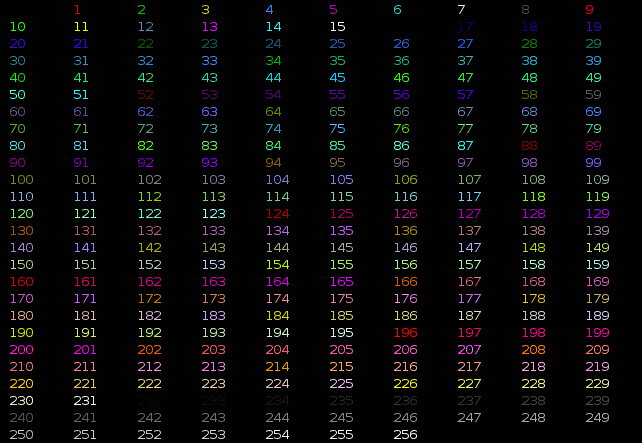
For using one of the 256 colors on the foreground (text color), the control sequence is “<Esc>[38;5;ColorNumberm” where ColorNumber is one of the following colors:
Examples:
| Code (Bash) | Preview |
|---|---|
| echo -e “\e[38;5;82mHello \e[38;5;198mWorld” |  |
| for i in {16..21} {21..16} ; do echo -en “\e[38;5;${i}m#\e[0m” ; done ; echo |  |
Background
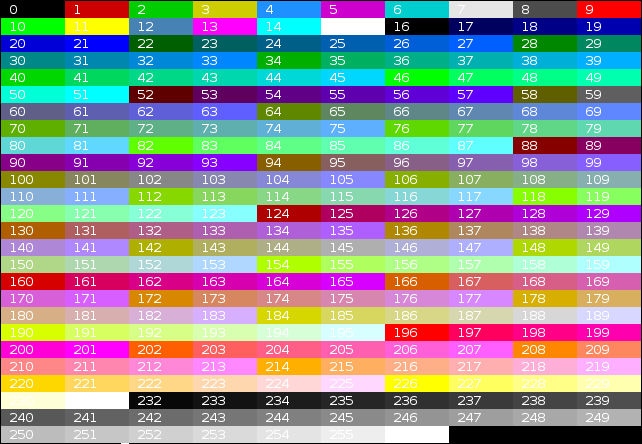
For using one of the 256 colors on the background, the control sequence is “<Esc>[48;5;ColorNumberm” where ColorNumber is one of the following colors:
Examples:
| Code (Bash) | Preview |
|---|---|
| echo -e “\e[40;38;5;82m Hello \e[30;48;5;82m World \e[0m” |  |
| for i in {16..21} {21..16} ; do echo -en “\e[48;5;${i}m \e[0m” ; done ; echo |  |
Attributes combination
Terminals allow attribute combinations. The attributes must be separated by a semicolon (“;”).
Examples:
| Description | Code (Bash) | Preview |
|---|---|---|
| Bold + Underlined | echo -e “\e[1;4mBold and Underlined” |  |
| Bold + Red forground + Green background | echo -e “\e[1;31;42m Yes it is awful \e[0m” |  |
Terminals compatibility
| Terminal | Formatting | Colors | Comment | ||||||||
|---|---|---|---|---|---|---|---|---|---|---|---|
| Bold | Dim | Underlined | Blink | invert | Hidden | 8 | 16 | 88 | 256 | ||
| aTerm | ok | - | ok | - | ok | - | ok | ~ | - | - | Lighter background instead of blink. |
| Eterm | ~ | - | ok | - | ok | - | ok | ~ | - | ok | Lighter color instead of Bold. Lighter background instead of blink. Can overline a text with the “^[[6m” sequence. |
| GNOME Terminal | ok | ok | ok | ok | ok | ok | ok | ok | - | ok | Strikeout with the “^[[9m” sequence. |
| Guake | ok | ok | ok | ok | ok | ok | ok | ok | - | ok | Strikeout with the “^[[9m” sequence. |
| Konsole | ok | - | ok | ok | ok | - | ok | ok | - | ok | |
| Nautilus Terminal | ok | ok | ok | ok | ok | ok | ok | ok | - | ok | Strikeout with the “^[[9m” sequence. |
| rxvt | ok | - | ok | ~ | ok | - | ok | ok | ok | - | If the background is not set to the default color, Blink make it lighter instead of blinking. Support of italic text with the “^[[3m” sequence. |
| Terminator | ok | ok | ok | - | ok | ok | ok | ok | - | ok | Strikeout with the “^[[9m” sequence. |
| Tilda | ok | - | ok | ok | ok | - | ok | ok | - | - | Underline instead of Dim. Convert 256-colors in 16-colors. |
| XFCE4 Terminal | ok | ok | ok | ok | ok | ok | ok | ok | - | ok | Strikeout with the “^[[9m” sequence. |
| XTerm | ok | - | ok | ok | ok | ok | ok | ok | - | ok | |
| xvt | ok | - | ok | - | ok | - | - | - | - | - | |
| Linux TTY | ok | - | - | - | ok | - | ok | ~ | - | - | Specials colors instead of Dim and Underlined. Lighter background instead of Blink, Bug with 88/256 colors. |
| VTE Terminal 3) | ok | ok | ok | ok | ok | ok | ok | ok | - | ok | Strikeout with the “^[[9m” sequence. |
Notations used in the table:
- “
ok”: Supported by the terminal. - “
~”: Supported in a special way by the terminal. - “
-”: Not supported at all by the terminal.
Demonstration programs
Colors and formatting (16 colors)
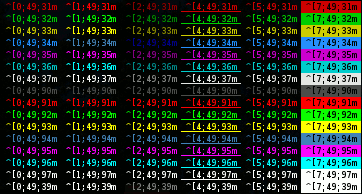
The following shell script displays a lot of possible combination of the attributes (but not all, because it uses only one formatting attribute at a time).
#!/bin/bash
This program is free software. It comes without any warranty, to
the extent permitted by applicable law. You can redistribute it
and/or modify it under the terms of the Do What The Fuck You Want
To Public License, Version 2, as published by Sam Hocevar. See
http://sam.zoy.org/wtfpl/COPYING for more details.
#Background for clbg in {40..47} {100..107} 49 ; do #Foreground for clfg in {30..37} {90..97} 39 ; do #Formatting for attr in 0 1 2 4 5 7 ; do #Print the result echo -en “\e[${attr};${clbg};${clfg}m ^[${attr};${clbg};${clfg}m \e[0m” done echo #Newline done done exit 0
256 colors
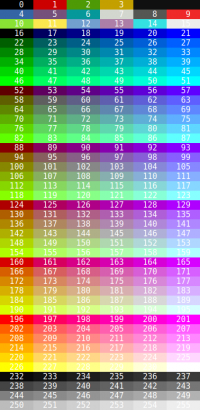
The following script display the 256 colors available on some terminals and terminals emulators like XTerm and GNOME Terminal.